


HELP!!!!!!! I NEED AN IT NERD DOUBLE QUICK!!!


Thread Starter

Joined: May 2003
Posts: 50,018
Likes: 259
From: Little India
 HELP!!!!!!! I NEED AN IT NERD DOUBLE QUICK!!!
got an exteranal hard drive with about 10 gig worth of pics on it
which has crashed
it's only 4 months old so taking it back is an option but i don't have the recipt
can i get these pics off the hard drive?
it's the past 5 years worth of family pics, and i mean every single pic i've ever taken on a digital camera that's on here and the mrs has thrown a total and utter wobbler and it looks like i'll be sleeping in the van tongiht if i don't get it fixed asap because she wants to have some pics to show
pleasepleasepleasepleasepleasepleasepleasepleasepl easepleasepleasepleasepleasepleasepleasepleaseplea sepleasepleasepleasepleasepleasepleasepleaseplease pleasepleasepleasepleasepleasepleasepleasepleasepl easepleasepleasepleasepleasepleasepleasepleaseplea sepleasepleasepleasepleasepleasepleasepleaseplease pleasepleasepleasepleasepleasepleasepleasepleasepl easepleasepleasepleasepleasepleasepleasepleaseplea sepleasepleasepleasepleasepleasepleasepleaseplease pleasepleasepleasepleasepleasepleasepleasepleasepl easepleasepleasepleasepleasepleasepleasepleaseplea sepleasepleasepleasepleasepleasepleasepleaseplease pleasepleasepleasepleasepleasepleasepleasepleasepl easepleasepleasepleasepleasepleasepleasepleaseplea sepleasepleasepleasepleasepleasepleasepleaseplease pleasepleasepleasepleaseplease can someon give me any ideas as to what i can do
if i don't answer it's because she's probably cut me bollcoks off
which has crashed
it's only 4 months old so taking it back is an option but i don't have the recipt
can i get these pics off the hard drive?
it's the past 5 years worth of family pics, and i mean every single pic i've ever taken on a digital camera that's on here and the mrs has thrown a total and utter wobbler and it looks like i'll be sleeping in the van tongiht if i don't get it fixed asap because she wants to have some pics to show
pleasepleasepleasepleasepleasepleasepleasepleasepl easepleasepleasepleasepleasepleasepleasepleaseplea sepleasepleasepleasepleasepleasepleasepleaseplease pleasepleasepleasepleasepleasepleasepleasepleasepl easepleasepleasepleasepleasepleasepleasepleaseplea sepleasepleasepleasepleasepleasepleasepleaseplease pleasepleasepleasepleasepleasepleasepleasepleasepl easepleasepleasepleasepleasepleasepleasepleaseplea sepleasepleasepleasepleasepleasepleasepleaseplease pleasepleasepleasepleasepleasepleasepleasepleasepl easepleasepleasepleasepleasepleasepleasepleaseplea sepleasepleasepleasepleasepleasepleasepleaseplease pleasepleasepleasepleasepleasepleasepleasepleasepl easepleasepleasepleasepleasepleasepleasepleaseplea sepleasepleasepleasepleasepleasepleasepleaseplease pleasepleasepleasepleaseplease can someon give me any ideas as to what i can do
if i don't answer it's because she's probably cut me bollcoks off




10K+ Poster!!


Joined: May 2003
Posts: 11,977
Likes: 1
From: Brierley Hill
Thats why I back up everything thats worth something to other media
Unless its a PSU problem, you are pretty much screwed, unless you fancy paying a LOT of money for a data retrieval company to sort it

Unless its a PSU problem, you are pretty much screwed, unless you fancy paying a LOT of money for a data retrieval company to sort it
Thread Starter
Joined: May 2003
Posts: 50,018
Likes: 259
From: Little India
been to pc world and the guy there was about as usefull as cancer 
"£100 for data recovery and it probably won't work, but we can farm it ou for £700 and it still might not work"
"so what do i do with this peice of shit that's now sitting here doing the grand sum of fucking up my life? you can't tell me if it's recoverable but you can't tell me if you won't wipe it either? what sort of muppet show are you guys running?"
"please do not swear sir"

"i've got virtually every single picture of my son on there for the past 2 years, including the ones when he was inside his mothers stomuch and 2 minutes after he was born onwards, soswearing is really the last of my fucking worries, if you know that usb drives are virtually unrecoverable then why don't you say that in big fucking letters above the ailse where you stock them? why do you sell wank like this one that doesn't have an on/off button and yet stand there and say that is the most likely cause?"
at this point, little kids in the queue behind me were crying and security made an apperance, so i exited stage left absolutly fucking fuming
i am now in hiding at the other house because the mrs has said basicly get the pics sorted or don't come home, so i'm not going to go hme because you know women are a bit bonkers when they start talking like that
i shall try the option of leaving it overnight to chill out a bit and then see if it works in the morning
and theni shall give it a bit of a slap to see if it works
but otherwise, what are my options?
do these data recovery peole that you see on csi and shit like that actually get data back? i would say money is no object but there has got to be a ball park figure or an upper level after which things start to go out of all resonable sanity surely
"£100 for data recovery and it probably won't work, but we can farm it ou for £700 and it still might not work"
"so what do i do with this peice of shit that's now sitting here doing the grand sum of fucking up my life? you can't tell me if it's recoverable but you can't tell me if you won't wipe it either? what sort of muppet show are you guys running?"
"please do not swear sir"
"i've got virtually every single picture of my son on there for the past 2 years, including the ones when he was inside his mothers stomuch and 2 minutes after he was born onwards, soswearing is really the last of my fucking worries, if you know that usb drives are virtually unrecoverable then why don't you say that in big fucking letters above the ailse where you stock them? why do you sell wank like this one that doesn't have an on/off button and yet stand there and say that is the most likely cause?"
at this point, little kids in the queue behind me were crying and security made an apperance, so i exited stage left absolutly fucking fuming
i am now in hiding at the other house because the mrs has said basicly get the pics sorted or don't come home, so i'm not going to go hme because you know women are a bit bonkers when they start talking like that
i shall try the option of leaving it overnight to chill out a bit and then see if it works in the morning
and theni shall give it a bit of a slap to see if it works
but otherwise, what are my options?
do these data recovery peole that you see on csi and shit like that actually get data back? i would say money is no object but there has got to be a ball park figure or an upper level after which things start to go out of all resonable sanity surely
Thread Starter
Joined: May 2003
Posts: 50,018
Likes: 259
From: Little India
Originally Posted by Stu.H
Thats why I back up everything thats worth something to other media
Unless its a PSU problem, you are pretty much screwed, unless you fancy paying a LOT of money for a data retrieval company to sort it
Unless its a PSU problem, you are pretty much screwed, unless you fancy paying a LOT of money for a data retrieval company to sort it

Trending Topics
try some data recovery software
http://www.sofotex.com/download/PC_U...Data_Recovery/
but make sure you read and understand what it is doing before you click YES to everything
http://www.sofotex.com/download/PC_U...Data_Recovery/
but make sure you read and understand what it is doing before you click YES to everything

PassionFord Post Whore!!

Joined: Sep 2004
Posts: 4,773
Likes: 86
From: Nottingham
When you say crashed, does it just not show on "My computer" or it does and you can't see directories or data?
Does it make any "noises" when you try and access it?
OOps too slow.
.
.
Does it make any "noises" when you try and access it?
OOps too slow.
.
.


Thread Starter
Joined: May 2003
Posts: 50,018
Likes: 259
From: Little India
Originally Posted by topaz
try some data recovery software
http://www.sofotex.com/download/PC_U...Data_Recovery/
but make sure you read and understand what it is doing before you click YES to everything
http://www.sofotex.com/download/PC_U...Data_Recovery/
but make sure you read and understand what it is doing before you click YES to everything
i just want me pictures back
Thread Starter
Joined: May 2003
Posts: 50,018
Likes: 259
From: Little India
Originally Posted by Adrian
What drive is it you have?
The unit powers up, can you hear the disk inside doing anything? Spinning up or clunking?
The unit powers up, can you hear the disk inside doing anything? Spinning up or clunking?
http://www.seagate.com/freeagent/
the 500 gig version
it works as in it can be heard spinning up, but it doesn't connect

PassionFord Post Whore!!
Joined: Apr 2004
Posts: 4,047
Likes: 0
From: Waterlooville....near Portsmouth
So when you connect it up it doesnt appear in My Computer? If it was a normal drive (doesnt look like it in the link) you could have removed it from the case and connect it via the cable inside the machine.
Shame you are not closer or I could have had a look, done a bit of hard disk recovery for people.
Shame you are not closer or I could have had a look, done a bit of hard disk recovery for people.

it could just be windows being funny mate. as said try on another PC. it says the disc is corrupt and unreadable but im pretty sure that the files are still intact and can be extracted.
as for data recovery service, I am willing to bet that the data is safe and CAN be extracted but the cost will be pretty steep. What I'm saying is, the data IS recoverable from these companies but for a price. Try another PC first before anything else
as for data recovery service, I am willing to bet that the data is safe and CAN be extracted but the cost will be pretty steep. What I'm saying is, the data IS recoverable from these companies but for a price. Try another PC first before anything else


PassionFord Post Whore!!
Joined: Jun 2003
Posts: 3,638
Likes: 0
From: In front of computer
Originally Posted by Metpol
PC world do a data recovery service.... First off I would turn it over and give it a firm slap with the hand. This might realign the head on the drive if it had become misaligned
A data recovery company will be able to retrieve the data for you although this will not be cheap, for approx 10GB of data expect to pay from £700 upwards. My firm had to send away 5 drives for this service that where badly damaged and paid £3000+ for the data.
10K+ Poster!!
Joined: May 2003
Posts: 11,977
Likes: 1
From: Brierley Hill
i bought a usb cable that i can use to connect any 2.5" laptop drive or 3.5" ide drive to any other machine as removable storage
might be worth trying that, but if that doesnt work, its become damaged somehow. You havent knocked it in any way have you, the slightest knock can render them useless.
If it has ur kid on from 2 yrs ago also from when he was born, its an expensive lesson to be learnt, and i bet you wont do it again!
10 gig worth of pics, that a fuck off lot of pics
might be worth trying that, but if that doesnt work, its become damaged somehow. You havent knocked it in any way have you, the slightest knock can render them useless.
If it has ur kid on from 2 yrs ago also from when he was born, its an expensive lesson to be learnt, and i bet you wont do it again!
10 gig worth of pics, that a fuck off lot of pics
Thread Starter
Joined: May 2003
Posts: 50,018
Likes: 259
From: Little India
Originally Posted by Stu.H
i bought a usb cable that i can use to connect any 2.5" laptop drive or 3.5" ide drive to any other machine as removable storage
might be worth trying that, but if that doesnt work, its become damaged somehow. You havent knocked it in any way have you, the slightest knock can render them useless.
If it has ur kid on from 2 yrs ago also from when he was born, its an expensive lesson to be learnt, and i bet you wont do it again!
10 gig worth of pics, that a fuck off lot of pics
might be worth trying that, but if that doesnt work, its become damaged somehow. You havent knocked it in any way have you, the slightest knock can render them useless.
If it has ur kid on from 2 yrs ago also from when he was born, its an expensive lesson to be learnt, and i bet you wont do it again!
10 gig worth of pics, that a fuck off lot of pics
how was i to know the drive would pack up while it was turned off
i've got probably about 3 gig worth of pics that i've found from various places, photobucket, hiding on the other pc's etc but not as much as i would have wanted
PassionFord Post Whore!!
Joined: Jun 2003
Posts: 3,638
Likes: 0
From: In front of computer
Do a search on the net for data recovery service and get one with a free estimate after you have exhausted all other options mentioned above. I wouldnt take what PC World say as most tech's that work there have not got a clue and probably run a free data recovery program from the net.
This will be the same with most small shops, you need to speak to a specialist company because they can re-engineer the drive if neccessary/possible.
This will be the same with most small shops, you need to speak to a specialist company because they can re-engineer the drive if neccessary/possible.

as the disk spins up?
and the connecting a device sound is coming?
open it, yes the warranty may go out then! is most likely is a IDE drive in there
connect it to your computer using the cable that is going to the cd rom, dvd what ever, connect it.
start up the computer, it should now pop up!
if it says that you have to format it make sure you quick format it (as that would take less time), and i would provide you a recovery tool!
option 2 is worth a try first though as i have done this the last week on my disk
connect the disk
right click on my computer ----> manage ----> then some where it should be something as disk management just click on that
then double click on my computer and see if it pops up!
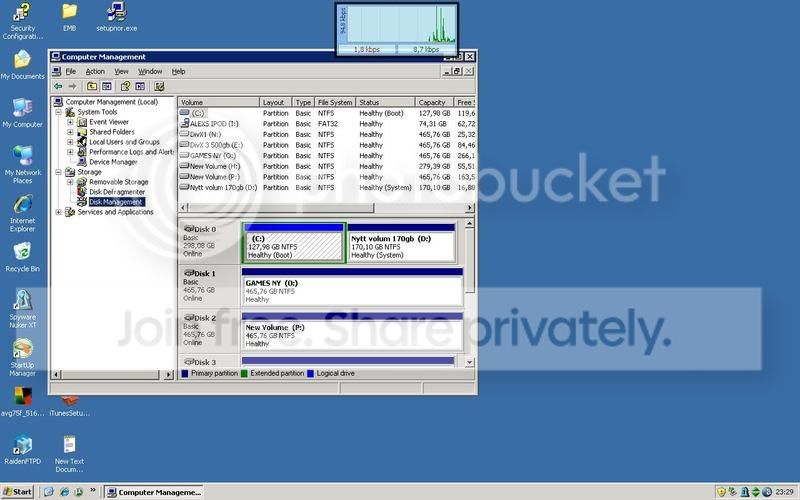
if that works get your self an gmail account and download gmail drive and save all the pics there as a backup
and the connecting a device sound is coming?
open it, yes the warranty may go out then! is most likely is a IDE drive in there
connect it to your computer using the cable that is going to the cd rom, dvd what ever, connect it.
start up the computer, it should now pop up!
if it says that you have to format it make sure you quick format it (as that would take less time), and i would provide you a recovery tool!
option 2 is worth a try first though as i have done this the last week on my disk
connect the disk
right click on my computer ----> manage ----> then some where it should be something as disk management just click on that
then double click on my computer and see if it pops up!
if that works get your self an gmail account and download gmail drive and save all the pics there as a backup

Joined: May 2003
Posts: 21,268
Likes: 147
From: The Dark Side of the Moon...
1) If the drive is spinning up physically, then the chances are it might not be fucked. Possibility that the transport from disk to PC might be fucked (ie, connection inside, or whatever). Take the disk out, try it in another case or using a different connection.
2) Slap your missus. How is it your fault the drive fucked up? Shit happens, sometimes it's not fun, but if it ain't your fault, then tell her to stop over-reacting...
2) Slap your missus. How is it your fault the drive fucked up? Shit happens, sometimes it's not fun, but if it ain't your fault, then tell her to stop over-reacting...

PassionFord Post Troll
Joined: Aug 2003
Posts: 2,537
Likes: 21
Might be a silly thought but does it have a double male ended USB cable? ie you could try another cable, the connector plugs do bugger up and the device won't work. May be worth a go if you haven't tried that first.
Otherwise I'd go for cracking it open and connecting it to a spare plug inside your PC case.
Otherwise I'd go for cracking it open and connecting it to a spare plug inside your PC case.
Joined: May 2003
Posts: 21,268
Likes: 147
From: The Dark Side of the Moon...
If someone can confirm it's an IDE drive inside, then you are welcome to drop it round to me and I'll stick it in my machine, or in one of my spare three external cases I have and see if it works or can find out whats wrong with it if you like.....
Only work if it's and IDE interface drive tho as I don't have any sata connections......
Only work if it's and IDE interface drive tho as I don't have any sata connections......
Originally Posted by Thrush
If someone can confirm it's an IDE drive inside, then you are welcome to drop it round to me and I'll stick it in my machine, or in one of my spare three external cases I have and see if it works or can find out whats wrong with it if you like.....
Only work if it's and IDE interface drive tho as I don't have any sata connections......
Only work if it's and IDE interface drive tho as I don't have any sata connections......
Thread Starter
Joined: May 2003
Posts: 50,018
Likes: 259
From: Little India
ok, now i need a normal basic spec nerd to translate what you lot just said
the cose don't seem to have any screws on nit, but it's languishing at the other house at the moment as i have ventured home
i will also require the services of someone who can repair leather as we now have a hole in the sofa from some sort of puncture wound that needs gluing back into place
as for the hard drive, what i want is to be able to retrive the pictures from it, sod the warranty as i'm about to go balistic when they open up tomorrow and give them all sorts of shit down the phone
it's like buying a racing harness which then doesn't work and kills you and the shop saying "well, we can replace the harness"
what fucking good is that
ok, how do i find out what this sata ide thing looks like without opening the drive up?
the cose don't seem to have any screws on nit, but it's languishing at the other house at the moment as i have ventured home
i will also require the services of someone who can repair leather as we now have a hole in the sofa from some sort of puncture wound that needs gluing back into place
as for the hard drive, what i want is to be able to retrive the pictures from it, sod the warranty as i'm about to go balistic when they open up tomorrow and give them all sorts of shit down the phone
it's like buying a racing harness which then doesn't work and kills you and the shop saying "well, we can replace the harness"
what fucking good is that
ok, how do i find out what this sata ide thing looks like without opening the drive up?


10K+ Poster!!
Joined: May 2003
Posts: 10,089
Likes: 2
From: Handcuffed to the Mrs' Bed ;-)
Righto,
inside your casing is a normal computer hard disk drive :

In a casing thus looking like this :
Now, if you can get the drive out of the external casing, put it in an anti static bag if possible, or a food freezer bag very tight so no moisture can get in, then slap it in the freezer for 24 hours.
Undo the screws on the back side of the tower case (modem for the real illiterate pc cunts) and take the side panel off.
Inside you will see the componants of your pc
Now, there will be an ide cable that runs from the motherboard to your hard drives and cd-roms :
One end plugs into your motherboard, and the other into your hard drive or cd rom. With most cables you can have 2 drives plugged in ( 2 x hard drives or 2 x dvd drives etc)
All you have to do is plug the "external" hard drive onto one of the ide cables, either from the cd-drive or current hard drive making a chain. You have to check jumper settings tho, which is a little bit of plastic on some pins on the drive :
 and on the drive there will be a diagram of how to set them. Master, Slave, and Cable Select. Think of this as 1, 2, and whatever the pc wants. Your drive with windows on will probably be a master, so set the external one as a slave. It should plug and play and be recognised in my computer.
You will of course need sufficiant space to transfer the data across.
I cannot guarantee how long the drive will be active for, or that it's not
already shagged beyone repair. If you don't live too far away I will quite happily come and have a butchers, but I can't guarantee much
HTH
inside your casing is a normal computer hard disk drive :
In a casing thus looking like this :
Now, if you can get the drive out of the external casing, put it in an anti static bag if possible, or a food freezer bag very tight so no moisture can get in, then slap it in the freezer for 24 hours.
Undo the screws on the back side of the tower case (modem for the real illiterate pc cunts) and take the side panel off.
Inside you will see the componants of your pc
Now, there will be an ide cable that runs from the motherboard to your hard drives and cd-roms :
One end plugs into your motherboard, and the other into your hard drive or cd rom. With most cables you can have 2 drives plugged in ( 2 x hard drives or 2 x dvd drives etc)
All you have to do is plug the "external" hard drive onto one of the ide cables, either from the cd-drive or current hard drive making a chain. You have to check jumper settings tho, which is a little bit of plastic on some pins on the drive :
and on the drive there will be a diagram of how to set them. Master, Slave, and Cable Select. Think of this as 1, 2, and whatever the pc wants. Your drive with windows on will probably be a master, so set the external one as a slave. It should plug and play and be recognised in my computer.You will of course need sufficiant space to transfer the data across.
I cannot guarantee how long the drive will be active for, or that it's not
already shagged beyone repair. If you don't live too far away I will quite happily come and have a butchers, but I can't guarantee much
HTH

Too many posts.. I need a life!!
Joined: Apr 2004
Posts: 574
Likes: 0
From: North West UK
Re: HELP!!!!!!! I NEED AN IT NERD DOUBLE QUICK!!!
Originally Posted by dojj
got an exteranal hard drive with about 10 gig worth of pics on it
which has crashed
it's only 4 months old so taking it back is an option but i don't have the recipt
can i get these pics off the hard drive?
it's the past 5 years worth of family pics, and i mean every single pic i've ever taken on a digital camera that's on here and the mrs has thrown a total and utter wobbler and it looks like i'll be sleeping in the van tongiht if i don't get it fixed asap because she wants to have some pics to show
pleasepleasepleasepleasepleasepleasepleasepleasepl easepleasepleasepleasepleasepleasepleasepleaseplea sepleasepleasepleasepleasepleasepleasepleaseplease pleasepleasepleasepleasepleasepleasepleasepleasepl easepleasepleasepleasepleasepleasepleasepleaseplea sepleasepleasepleasepleasepleasepleasepleaseplease pleasepleasepleasepleasepleasepleasepleasepleasepl easepleasepleasepleasepleasepleasepleasepleaseplea sepleasepleasepleasepleasepleasepleasepleaseplease pleasepleasepleasepleasepleasepleasepleasepleasepl easepleasepleasepleasepleasepleasepleasepleaseplea sepleasepleasepleasepleasepleasepleasepleaseplease pleasepleasepleasepleasepleasepleasepleasepleasepl easepleasepleasepleasepleasepleasepleasepleaseplea sepleasepleasepleasepleasepleasepleasepleaseplease pleasepleasepleasepleaseplease can someon give me any ideas as to what i can do
if i don't answer it's because she's probably cut me bollcoks off
which has crashed
it's only 4 months old so taking it back is an option but i don't have the recipt
can i get these pics off the hard drive?
it's the past 5 years worth of family pics, and i mean every single pic i've ever taken on a digital camera that's on here and the mrs has thrown a total and utter wobbler and it looks like i'll be sleeping in the van tongiht if i don't get it fixed asap because she wants to have some pics to show
pleasepleasepleasepleasepleasepleasepleasepleasepl easepleasepleasepleasepleasepleasepleasepleaseplea sepleasepleasepleasepleasepleasepleasepleaseplease pleasepleasepleasepleasepleasepleasepleasepleasepl easepleasepleasepleasepleasepleasepleasepleaseplea sepleasepleasepleasepleasepleasepleasepleaseplease pleasepleasepleasepleasepleasepleasepleasepleasepl easepleasepleasepleasepleasepleasepleasepleaseplea sepleasepleasepleasepleasepleasepleasepleaseplease pleasepleasepleasepleasepleasepleasepleasepleasepl easepleasepleasepleasepleasepleasepleasepleaseplea sepleasepleasepleasepleasepleasepleasepleaseplease pleasepleasepleasepleasepleasepleasepleasepleasepl easepleasepleasepleasepleasepleasepleasepleaseplea sepleasepleasepleasepleasepleasepleasepleaseplease pleasepleasepleasepleaseplease can someon give me any ideas as to what i can do
if i don't answer it's because she's probably cut me bollcoks off
i dont thing it'd go down too well, so less of the nerd please
 . Would have helped you otherwise!
Also, why go into <wherever> ranting and raving? The item failed. Items do fail, sometimes they fail straightaway, sometimes after a while, sometimes never. Everything fails. You car fails. It's not the lad in the shops fault is it
.If the data was so precious then why the fuck didnt you back it up when you when transferring data or whatever you were doing? Are pc related items immune from fuck ups? Are you? Well then
I sympathise, but accept you should have fucking backed it up if it was that important.
In response to yours and whoevers probably nasty response it reply (after all you have posted 1000's on PF
 ), fuck you, i have a life so probably wont even read the reply as i dont live on here .
Im a support tech and back up data before i even touch a pc im going to do anything on it's ghosted straight away. Back it up. Understand??



PassionFord Post Whore!!
Joined: May 2004
Posts: 5,489
Likes: 1
From: Deep in the underground
Can we get back to basics here!?
What error is coming up when you plug it in/try to access it?
It could be something simple like fixdisk needs running.
If you want it sorting, you need to tell us EXACTLY what error is showing, what it does or doesnt do.
Just saying its crashed doesnt help anyone try to get it working again for you!
What error is coming up when you plug it in/try to access it?
It could be something simple like fixdisk needs running.
If you want it sorting, you need to tell us EXACTLY what error is showing, what it does or doesnt do.
Just saying its crashed doesnt help anyone try to get it working again for you!
does windows recognize the hard drive first of all? I'm guessing from what you've said it comes up as a removable device on my computer but won't let you access it? whilst connected have a look at what drive letter it is should be something like e: f: g: etc etc.
Open command prompt/MS-DOS and type chkdsk x: where the x is the corresponding drive letter of your hard drive so you are going to type for example chkdsk f: or chkdsk g:
It will then attempt to check the said drive for errors. See if it can do it and also what error message comes up on command prompt
Open command prompt/MS-DOS and type chkdsk x: where the x is the corresponding drive letter of your hard drive so you are going to type for example chkdsk f: or chkdsk g:
It will then attempt to check the said drive for errors. See if it can do it and also what error message comes up on command prompt