


hard drive



Advanced PassionFord User
Joined: Jun 2004
Posts: 1,521
Likes: 0
From: Aberdeenshire

For ease of use u could just buy another one and add it or even easier buy a USB data storage disk as its juts plug and play 
http://www.dabs.com/productview.aspx...avigationKey=0
http://www.dabs.com/productview.aspx...avigationKey=0

Professional Waffler
Joined: May 2004
Posts: 27,883
Likes: 7
From: west midlands
To be honest any hard drive you get should be very easy to install, just a case of opening your case and plugging 1 or 2 things in and thats it! just need to look at your original hard drive or the manual to see what type yours is i.e SATA or IDE, there just different connections.
And as for how much gb, how many rainy days are there in a year?
Seriously though, depends what your doing on your pc, if its mega downloading you do then id say at least 200GB+, if its only browsing the net and word documents etc then id say 60-80 gb
And as for how much gb, how many rainy days are there in a year?
Seriously though, depends what your doing on your pc, if its mega downloading you do then id say at least 200GB+, if its only browsing the net and word documents etc then id say 60-80 gb

10K+ Poster!!
Joined: May 2003
Posts: 10,089
Likes: 2
From: Handcuffed to the Mrs' Bed ;-)
This is easy to do.
Open up the side of the case (usually 2 or 3 screws at the back then slide the side off).
You'll see a cable running from the bainboard to your hard disk drive, and one from the power adaptor to the drive.
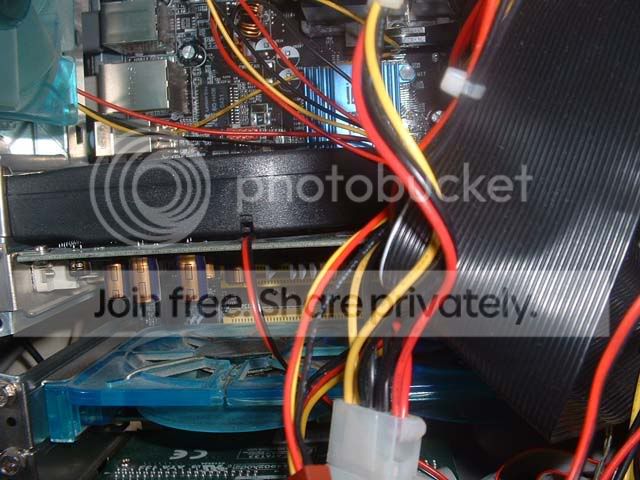
IDE connection is the black wide cable in this pic
This is a SATA connection
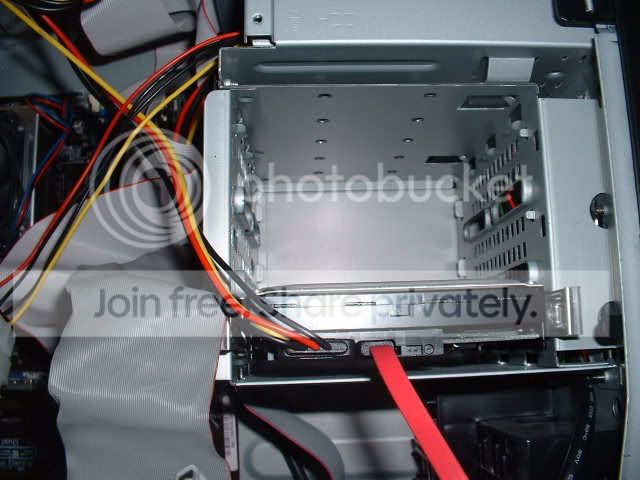
If it's the top connection type, then there will be 2 connectors on it, allowing 2 drives to be attached. On the har drive itself, where the cables plug into it, there will be a set of pins, with a small peice of plastic covering it. This is a jumper (not wolly) and set's the driver paramaters. If putting an additional drive in, it need's to be covering the 2 pins indicationg SLAVE (the drive should have instructions on how to do this). If it's a direct replacement, set it to MASTER.
Open up the side of the case (usually 2 or 3 screws at the back then slide the side off).
You'll see a cable running from the bainboard to your hard disk drive, and one from the power adaptor to the drive.
IDE connection is the black wide cable in this pic
This is a SATA connection
If it's the top connection type, then there will be 2 connectors on it, allowing 2 drives to be attached. On the har drive itself, where the cables plug into it, there will be a set of pins, with a small peice of plastic covering it. This is a jumper (not wolly) and set's the driver paramaters. If putting an additional drive in, it need's to be covering the 2 pins indicationg SLAVE (the drive should have instructions on how to do this). If it's a direct replacement, set it to MASTER.

I've found that life I needed.. It's HERE!!
Joined: May 2004
Posts: 1,485
Likes: 0
On a semi-serious note. Turn the damn thing OFF and unplug the power before even thinking about opening the case up.
Repaired more than you think with 'but the instructions didn't say turn it off'
Repaired more than you think with 'but the instructions didn't say turn it off'

Trending Topics


Thread
Thread Starter
Forum
Replies
Last Post
TPM961
Restorations, Rebuilds & Projects.
19
Jan 15, 2018 10:50 AM