Computers, Consoles and I.T. Post all computer related chat in here for our I.T techies to help with. Please be aware that any discussions related to piracy will be removed and render the member liable to a possible ban. Piracy renders PassionFord Admin liable for prosecution, as well as its members.

quick favour anyone

Thread Tools
 
Search this Thread
 
Old Oct 26, 2007 | 06:39 PM
  #1  
StephenC's Avatar
StephenC
Thread Starter
..BS Motorsport..
 
Joined: May 2003
Posts: 4,118
Likes: 10
From: Ponte-carlo
Default quick favour anyone

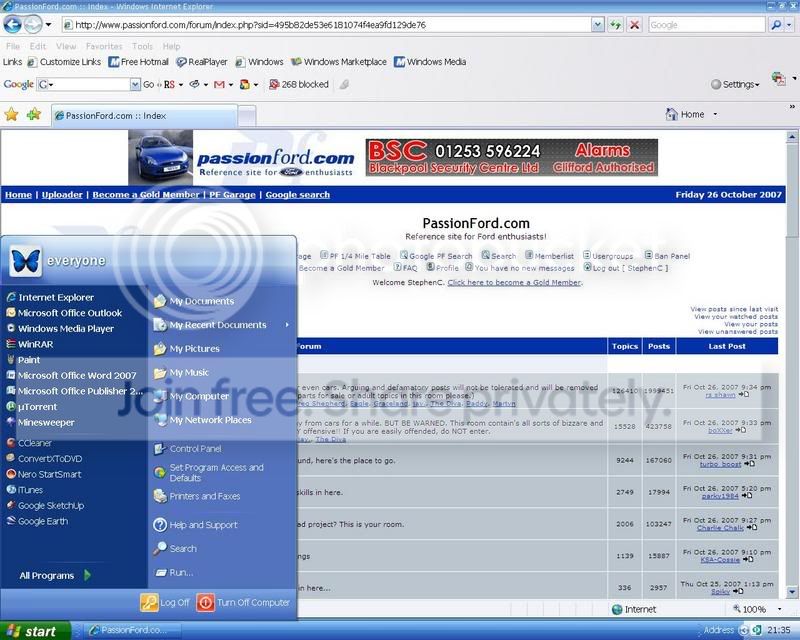
Ive just got back to home pc and kids have been messing with windows fonts and shit and the whole thing looks a right mess, ive put them back to what I think is normal but it still doesnt look right? Could some one have a quick look in display--appearance--advanced and let me know what fonts are normally used and what size. Internet explorer seems worst as does task bar
Reply
Old Oct 26, 2007 | 08:20 PM
  #2  
BM08's Avatar
BM08
Professional Waffler
 
Joined: May 2004
Posts: 27,883
Likes: 7
From: west midlands
Default

I think your on about win xp yeah? im on Vista at the moment so ive got different menu's.

Show my a screenshot and i "might" remember what the settings "should" be
Reply
Old Oct 26, 2007 | 08:36 PM
  #3  
StephenC's Avatar
StephenC
Thread Starter
..BS Motorsport..
 
Joined: May 2003
Posts: 4,118
Likes: 10
From: Ponte-carlo
Default

Reply
Old Oct 26, 2007 | 09:05 PM
  #4  
BM08's Avatar
BM08
Professional Waffler
 
Joined: May 2004
Posts: 27,883
Likes: 7
From: west midlands
Default

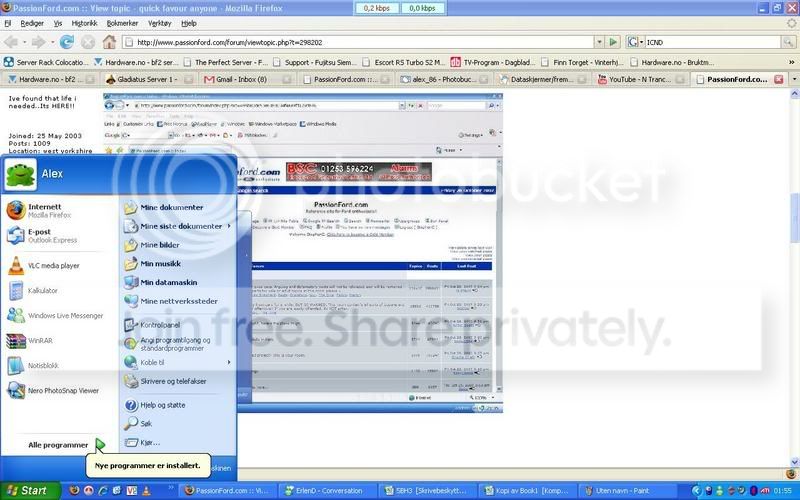
cant see anything wrong there what do you think isnt right? and ill see if i know how to get it back
Reply
Old Oct 26, 2007 | 09:21 PM
  #5  
StephenC's Avatar
StephenC
Thread Starter
..BS Motorsport..
 
Joined: May 2003
Posts: 4,118
Likes: 10
From: Ponte-carlo
Default

for me the txt where the tabs are in explorer look lost (tab seems massive with strange font txt), icons in toolbar are all blocky for some reason. And the text on the start menu seems wrong font. The actual content in internet explorer is fine, its just the menus/tabs.

Im on laptop now and that screen grab looks okay to me also wonder if its monitor settings maybe?
Reply
Old Oct 26, 2007 | 09:59 PM
  #6  
BM08's Avatar
BM08
Professional Waffler
 
Joined: May 2004
Posts: 27,883
Likes: 7
From: west midlands
Default

Hmm strange.

You could just use system restore and restore back to yesterday or whenever the pc looked fine
Reply
Old Oct 26, 2007 | 10:35 PM
  #7  
Thrush's Avatar
Thrush
Irritating c........
20 Year Member
Liked
Loved
Community Favorite
iTrader: (1)
 
Joined: May 2003
Posts: 21,268
Likes: 147
From: The Dark Side of the Moon...
Default

I am not familer with XP MCE (looks like Media Centre anyway) so coudln't tell you if it is wrong or not, but I'd do what he above says - restore back to yesterday and it should reset itself... START > ALL PROGRAMMES > ACCESSORIES > SYSTEM TOOLS : System Restore...
Reply
Old Oct 26, 2007 | 11:39 PM
  #8  
StephenC's Avatar
StephenC
Thread Starter
..BS Motorsport..
 
Joined: May 2003
Posts: 4,118
Likes: 10
From: Ponte-carlo
Default

jobs a good un, cheers chaps
Reply
Old Oct 28, 2007 | 12:01 AM
  #9  
Alex_86's Avatar
Alex_86
Advanced PassionFord User
iTrader: (2)
 
Joined: Jan 2006
Posts: 1,961
Likes: 0
From: cold place
Default

the default looks like this


you fix it this way

right click on the desktop
go to properties
looks(nr 4 from left)
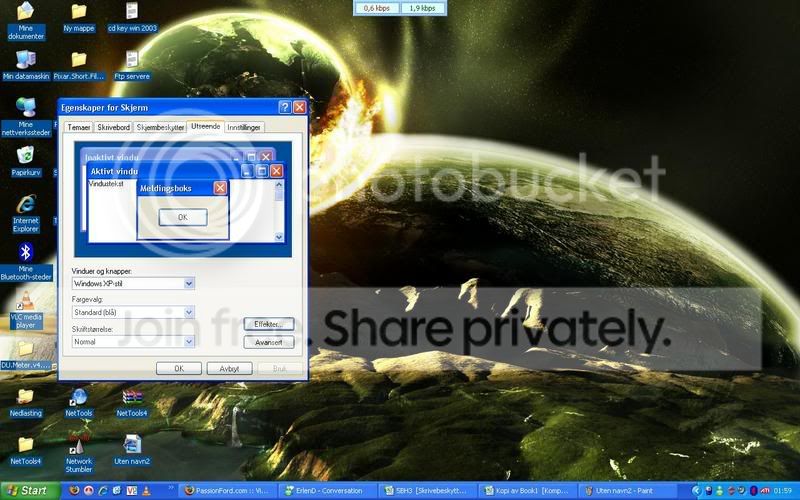

it should be on

standard XP style
standard blue
normal
Reply
Related Topics
Thread
Thread Starter
Forum
Replies
Last Post
tankybaby66
Cars for Sale
49
Feb 6, 2016 02:24 PM
locum8
Technical help Q & A
5
Oct 1, 2015 01:50 PM
Fudgey
General Car Related Discussion.
21
Sep 30, 2015 06:19 PM
SMILER258
Restorations, Rebuilds & Projects.
36
Sep 28, 2015 09:04 AM
DixieTheKid
Ford Sierra/Sapphire/RS500 Cosworth
2
Sep 14, 2015 09:04 PM


All times are GMT. The time now is 02:55 AM.