


Sky+ Users...


Thread Starter
www.ctuceilings.co.uk
Joined: May 2003
Posts: 9,370
Likes: 0
From: Kent
 Sky+ Users...
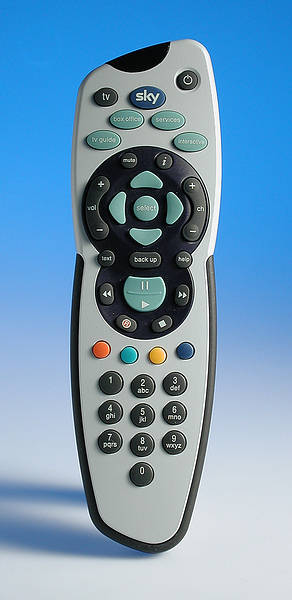
Is there a shortcut to flick back and forth between channels? Say, I am watching Paramount (127), then flick to MTV (444), can I pres one button to flick back and forth?
If so... What is it? I can't find the destruction manual lol

Thanks
If so... What is it? I can't find the destruction manual lol
Thanks


 I like where you are coming from though


Trending Topics
Windows Media Center is one million times better to use than Sky+ when you get used to it! Just one button to flick between previous and current channel, and it remembers what channel you are watching when you go into the guide unlike Sky where you have to find the bugger again every time you press TV Guide 

Thread Starter
www.ctuceilings.co.uk
Joined: May 2003
Posts: 9,370
Likes: 0
From: Kent
Originally Posted by Phil
Windows Media Center is one million times better to use than Sky+ when you get used to it! Just one button to flick between previous and current channel, and it remembers what channel you are watching when you go into the guide unlike Sky where you have to find the bugger again every time you press TV Guide
I just press back up to get out of the guide and it goes back to the channel I was watching, I thought it was normal

just finding my feet
Joined: May 2003
Posts: 41,052
Likes: 2
From: Im behind you
tone ya would have a nightmare at our house, my little girl has broken our remote somehow (and she cant talk to expalin so just points at it ) and we have to get up to the tv/video to change the channels all the time, last night i watched 3 kings as i couldnt be arsed to get up and change the channel
) and we have to get up to the tv/video to change the channels all the time, last night i watched 3 kings as i couldnt be arsed to get up and change the channel
Never knew it did that
Maybe the bit I was getting annoyed about was every time you press TV Guide it starts from the main menu so you have to flick through the pages until you get to the channel you are on for the guide?
I dunno
Maybe the bit I was getting annoyed about was every time you press TV Guide it starts from the main menu so you have to flick through the pages until you get to the channel you are on for the guide?
I dunno
Thread Starter
www.ctuceilings.co.uk
Joined: May 2003
Posts: 9,370
Likes: 0
From: Kent
Originally Posted by Phil
Maybe the bit I was getting annoyed about was every time you press TV Guide it starts from the main menu so you have to flick through the pages until you get to the channel you are on for the guide?
PMSL @ Ginge, I would buy a new remote, but 3 Kings isn't a bad film
just finding my feet
Joined: May 2003
Posts: 41,052
Likes: 2
From: Im behind you
I would buy a new remote
besides when my little girl gets older we cant get her to change the channels
she already brings us the phone when it rings
just finding my feet
Joined: May 2003
Posts: 41,052
Likes: 2
From: Im behind you
i think i prefer seeingall the channels as then ya see the programs ya might have forgoten about 
if ya wanna do it from the program ya on then search channel by channel, thats a function i fooking hate
i also hate the press red function at the top that always resets every time ya change channel
if ya wanna do it from the program ya on then search channel by channel, thats a function i fooking hate
i also hate the press red function at the top that always resets every time ya change channel



just finding my feet
Joined: May 2003
Posts: 41,052
Likes: 2
From: Im behind you
bill i get at times the the program i was watching when scanning through, also noticed that if ya scan though the channels too much the fooker crashes
i wanna know is there anyway i can get rid of mic jagger bollox on the starting screen
"THEN COME OWWNNNNN,,,,,,,,,,,,,,, press the RED BUTTON"
( never knew how much i hated about sky till this post )
i wanna know is there anyway i can get rid of mic jagger bollox on the starting screen
"THEN COME OWWNNNNN,,,,,,,,,,,,,,, press the RED BUTTON"
( never knew how much i hated about sky till this post
)



Regular Contributor
Joined: May 2003
Posts: 273
Likes: 0
From: Bed.....Ford Shire
The background music was the same as Colin Mcrae 3 for a while, which was OK. To turn off is pretty tricky NOT...
SERVICES
2
Background Music = OFF
RTFM b19bal
Phil - if you want to see whats on the current channel, just use the right arrow and you'll get about 6hrs worth of future programs. Search n scan baby!
Newts
NOT...SERVICES
2
Background Music = OFF
RTFM b19bal
Phil - if you want to see whats on the current channel, just use the right arrow and you'll get about 6hrs worth of future programs. Search n scan baby!
Newts



10K+ Poster!!
Joined: May 2003
Posts: 10,089
Likes: 2
From: Handcuffed to the Mrs' Bed ;-)
Just learn the numbers from the channels you most frequently watch m8
As said, 127 is Paramount, 208 Is Friendly / Babecast, 401 is Sky Sports 1, 301 is Sky Movies 1 ( i think i got them the right way round lol) 101 is BBC 1 440 is MTV, E4 is 163 I think, 
POP m8
As said, 127 is Paramount, 208 Is Friendly / Babecast, 401 is Sky Sports 1, 301 is Sky Movies 1 ( i think i got them the right way round lol) 101 is BBC 1
440 is MTV, E4 is 163 I think, POP m8
just finding my feet
Joined: May 2003
Posts: 41,052
Likes: 2
From: Im behind you
As said, 127 is Paramount, 208 Is Friendly / Babecast, 401 is Sky Sports 1, 301 is Sky Movies 1 ( i think i got them the right way round lol) 101 is BBC 1 440 is MTV, E4 is 163 I think,

Thread
Thread Starter
Forum
Replies
Last Post