


Computer/Internet Help


Thread Starter
Advanced PassionFord User
Joined: Jun 2005
Posts: 2,388
Likes: 0
From: Northern Ireland
 Computer/Internet Help
Right ive got a 4mb BT Broadband line in my house blah blah...
using bt broadband home hub...
had an engineer out today and he was receiving speeds of over 3mb on his laptop with his own wee modem thingy... now on my pc i can only EVER get speeds of about 30kb/s whether im downloading from microsoft.com or any other website.. so i think something might either be wrong with the settings on my computer or the home hub needs some ports opened or some bollocks...
windows firewall is off....
can anyone help? its doing my absolute fucking titties in!!!
if not the computer is getting some
using bt broadband home hub...
had an engineer out today and he was receiving speeds of over 3mb on his laptop with his own wee modem thingy... now on my pc i can only EVER get speeds of about 30kb/s whether im downloading from microsoft.com or any other website.. so i think something might either be wrong with the settings on my computer or the home hub needs some ports opened or some bollocks...
windows firewall is off....
can anyone help? its doing my absolute fucking titties in!!!
if not the computer is getting some
Thread Starter
Advanced PassionFord User
Joined: Jun 2005
Posts: 2,388
Likes: 0
From: Northern Ireland
Tried it with my old router too instead of that bthomehub thing and it came back with the same speed so now im thinking it isnt the homehub that its something on my computer... how do i change this shit to make it run properly? are there ports need opened or something?


Advanced PassionFord User
Joined: Sep 2006
Posts: 2,107
Likes: 0
From: Micklefield, nr Leeds
Are you using USB or ethernet interface?? If using USB, fucking bin it and use ethernet 
If your laptop is only downloading at 30kb/s as well then it cant be a fault with your pc can it?
Check all your filters, unplug any extensions and try it. You might be getting line noise from an unfiltered extension (sky box, redcare etc)
The BT HomeHub's are shite though, bodged up thomson speedtouch firmware that they've managed to make even worse.
Installed one for a mate, pc over USB (didnt have a ethernet card in the pc at the time) wouldnt connect to the internet unless laptop was connected over wireless. Disable wireless on the laptop and the PC loses internet altogether. fuckin explain that one
Buy a Linksys router, then you'll know for sure if it's a line/internal wiring problem. I don't trust BT routers as far as i can throw them, and believe me i've wanted to many a time
Also, your line may sync at 4mbit but you may not get anywhere near those DL speeds. But 30kb/s is extremely low.
Mine sync's at 1mbit but only downloads at max of 80kb/s because i'm fuckin miles away from my exchange in the middle of a field
If your laptop is only downloading at 30kb/s as well then it cant be a fault with your pc can it?
Check all your filters, unplug any extensions and try it. You might be getting line noise from an unfiltered extension (sky box, redcare etc)
The BT HomeHub's are shite though, bodged up thomson speedtouch firmware that they've managed to make even worse.
Installed one for a mate, pc over USB (didnt have a ethernet card in the pc at the time) wouldnt connect to the internet unless laptop was connected over wireless. Disable wireless on the laptop and the PC loses internet altogether. fuckin explain that one
Buy a Linksys router, then you'll know for sure if it's a line/internal wiring problem. I don't trust BT routers as far as i can throw them, and believe me i've wanted to many a time
Also, your line may sync at 4mbit but you may not get anywhere near those DL speeds. But 30kb/s is extremely low.
Mine sync's at 1mbit but only downloads at max of 80kb/s because i'm fuckin miles away from my exchange in the middle of a field
Thread Starter
Advanced PassionFord User
Joined: Jun 2005
Posts: 2,388
Likes: 0
From: Northern Ireland
Download - 225KB/s
Upload - 282KB/s
Roughly the same on both the laptop and pc.
So im confused as fuck...
Ive tried two different routers, one bt home hub and the other is a DLink DSL604+
Any ideas?
Upload - 282KB/s
Roughly the same on both the laptop and pc.
So im confused as fuck...
Ive tried two different routers, one bt home hub and the other is a DLink DSL604+
Any ideas?
Trending Topics
Advanced PassionFord User
Joined: Sep 2006
Posts: 2,107
Likes: 0
From: Micklefield, nr Leeds
Have you got norton internet "security" or any other "security" software installed?
Have you got security enabled (WEP/WPA) on your wireless? Your next door neighbour might be hammering bit-torrent
Have you got security enabled (WEP/WPA) on your wireless? Your next door neighbour might be hammering bit-torrent
Thread Starter
Advanced PassionFord User
Joined: Jun 2005
Posts: 2,388
Likes: 0
From: Northern Ireland
Originally Posted by BigMouthBillyBass
Are you using USB or ethernet interface?? If using USB, fucking bin it and use ethernet
If your laptop is only downloading at 30kb/s as well then it cant be a fault with your pc can it?
Check all your filters, unplug any extensions and try it. You might be getting line noise from an unfiltered extension (sky box, redcare etc)
The BT HomeHub's are shite though, bodged up thomson speedtouch firmware that they've managed to make even worse.
Installed one for a mate, pc over USB (didnt have a ethernet card in the pc at the time) wouldnt connect to the internet unless laptop was connected over wireless. Disable wireless on the laptop and the PC loses internet altogether. fuckin explain that one
Buy a Linksys router, then you'll know for sure if it's a line/internal wiring problem. I don't trust BT routers as far as i can throw them, and believe me i've wanted to many a time
Also, your line may sync at 4mbit but you may not get anywhere near those DL speeds. But 30kb/s is extremely low.
Mine sync's at 1mbit but only downloads at max of 80kb/s because i'm fuckin miles away from my exchange in the middle of a field
If your laptop is only downloading at 30kb/s as well then it cant be a fault with your pc can it?
Check all your filters, unplug any extensions and try it. You might be getting line noise from an unfiltered extension (sky box, redcare etc)
The BT HomeHub's are shite though, bodged up thomson speedtouch firmware that they've managed to make even worse.
Installed one for a mate, pc over USB (didnt have a ethernet card in the pc at the time) wouldnt connect to the internet unless laptop was connected over wireless. Disable wireless on the laptop and the PC loses internet altogether. fuckin explain that one
Buy a Linksys router, then you'll know for sure if it's a line/internal wiring problem. I don't trust BT routers as far as i can throw them, and believe me i've wanted to many a time
Also, your line may sync at 4mbit but you may not get anywhere near those DL speeds. But 30kb/s is extremely low.
Mine sync's at 1mbit but only downloads at max of 80kb/s because i'm fuckin miles away from my exchange in the middle of a field
he installed a new master box and also a master ADSL box too which a wire runs straight from that up to my router so it cant be a wiring fault.
Thread Starter
Advanced PassionFord User
Joined: Jun 2005
Posts: 2,388
Likes: 0
From: Northern Ireland
Originally Posted by BigMouthBillyBass
Have you got norton internet "security" or any other "security" software installed?
Have you got security enabled (WEP/WPA) on your wireless? Your next door neighbour might be hammering bit-torrent
Have you got security enabled (WEP/WPA) on your wireless? Your next door neighbour might be hammering bit-torrent
But yes the bt home hub has wep enabled.
Thread Starter
Advanced PassionFord User
Joined: Jun 2005
Posts: 2,388
Likes: 0
From: Northern Ireland
Originally Posted by DanRSturbo
That's about right for a 3 meg line, give or take a few kb a second. A 10 meg line gives 1000k a sec.
Advanced PassionFord User
Joined: Sep 2006
Posts: 2,107
Likes: 0
From: Micklefield, nr Leeds
Originally Posted by ryan_belfast
Originally Posted by DanRSturbo
That's about right for a 3 meg line, give or take a few kb a second. A 10 meg line gives 1000k a sec.
Go to your bt master socket, take the 2 screws out of the front and take the panel off the front. inside there is another socket. Plug your filter into this and your router into the filter. This has now isolated all your extension sockets, and the only thing in the house connected to a phone line is now your router that you have just plugged in. try it again and see what speeds you get

This will rule out any internal wiring issues.

Advanced PassionFord User
Joined: Sep 2006
Posts: 2,107
Likes: 0
From: Micklefield, nr Leeds
4mb doesnt mean 4mb. When you take into account network overheads, contention ratio's, distance from the exchange, plus it's on BTBroadband (hardly the fastest ISP) etc
1mbit usually gets around 90-120kbps depending on location, distance from exchange etc
1mbit usually gets around 90-120kbps depending on location, distance from exchange etc
Thread Starter
Advanced PassionFord User
Joined: Jun 2005
Posts: 2,388
Likes: 0
From: Northern Ireland
Originally Posted by BigMouthBillyBass
Originally Posted by ryan_belfast
Originally Posted by DanRSturbo
That's about right for a 3 meg line, give or take a few kb a second. A 10 meg line gives 1000k a sec.
Go to your bt master socket, take the 2 screws out of the front and take the panel off the front. inside there is another socket. Plug your filter into this and your router into the filter. This has now isolated all your extension sockets, and the only thing in the house connected to a phone line is now your router that you have just plugged in. try it again and see what speeds you get
This will rule out any internal wiring issues.

It cant be a wiring issue cos he took the wire that goes into my router and put it into his modem and it came up with 3.8mb and im only getting 300kbs..
Thread Starter
Advanced PassionFord User
Joined: Jun 2005
Posts: 2,388
Likes: 0
From: Northern Ireland
Originally Posted by BigMouthBillyBass
4mb doesnt mean 4mb. When you take into account network overheads, contention ratio's, distance from the exchange, plus it's on BTBroadband (hardly the fastest ISP) etc
1mbit usually gets around 90-120kbps depending on location, distance from exchange etc
1mbit usually gets around 90-120kbps depending on location, distance from exchange etc
Advanced PassionFord User
Joined: Sep 2006
Posts: 2,107
Likes: 0
From: Micklefield, nr Leeds
your confused.... it's 3.8m/BIT not 3.8 m/BYTE!
if you have a 4mb line it doesnt mean you can download at 4 megabytes per second
300kb/s is about right for the line speed you are on
which is what that test shows.
speedtest shows your line speed in k/bit which is 4000k/bit - that test you showed was in k/bytes. the download speed your computer will show on a bitorrent/internet explorer download. 8 bits in a byte
if you have a 4mb line it doesnt mean you can download at 4 megabytes per second
300kb/s is about right for the line speed you are on
which is what that test shows.
speedtest shows your line speed in k/bit which is 4000k/bit - that test you showed was in k/bytes. the download speed your computer will show on a bitorrent/internet explorer download. 8 bits in a byte

Advanced PassionFord User
Joined: Sep 2006
Posts: 2,107
Likes: 0
From: Micklefield, nr Leeds
Originally Posted by ryan_belfast
Well how come before, it was downloading at around 3200/3400 and now its downloading at only 300?
Thread Starter
Advanced PassionFord User
Joined: Jun 2005
Posts: 2,388
Likes: 0
From: Northern Ireland
well how do you explain this then, i was frequently getting around this speed??? this is a test i did a few weeks ago when the line was running well...

I think you guys are the ones getting confused about what it should be.
For example, when im downloading something from microsoft.com - you would think it would be downloading rather quick, well errr no, i cant get anything over 20kb/s
I think you guys are the ones getting confused about what it should be.
For example, when im downloading something from microsoft.com - you would think it would be downloading rather quick, well errr no, i cant get anything over 20kb/s
Advanced PassionFord User
Joined: Sep 2006
Posts: 2,107
Likes: 0
From: Micklefield, nr Leeds
Originally Posted by ryan_belfast
well how do you explain this then, i was frequently getting around this speed??? this is a test i did a few weeks ago when the line was running well...
I think you guys are the ones getting confused about what it should be.
For example, when im downloading something from microsoft.com - you would think it would be downloading rather quick, well errr no, i cant get anything over 20kb/s
I think you guys are the ones getting confused about what it should be.
For example, when im downloading something from microsoft.com - you would think it would be downloading rather quick, well errr no, i cant get anything over 20kb/s
according to the rev counter thing on the right hand side your about 8mbit
Thread Starter
Advanced PassionFord User
Joined: Jun 2005
Posts: 2,388
Likes: 0
From: Northern Ireland
No its not, jesus... go and do a test yourself and you'll see... that works out at just under a 3mb line..
Right its near enough 10x slower than what im supposed to be getting and that is reflected in my downloads, i cant get anything faster than about 30kbs when it used to download at around 200/300kbs.
no that rev counter is the same for anything, its just a still demonstrator pic lol
Right its near enough 10x slower than what im supposed to be getting and that is reflected in my downloads, i cant get anything faster than about 30kbs when it used to download at around 200/300kbs.
no that rev counter is the same for anything, its just a still demonstrator pic lol
Ryan....you are completely right in what you are saying - I understand where you are coming from.....274kb/s from SpeedTest.net is appauling especially on a supposed 4Mb line!!
Sounds to me like there is definately something amiss on one/both of your computers, could be virus or spyware related or, someone else using your connection to be honest!!!
Have you tried to connect to the internet with either just the laptop or just the computer switched on? I'd be inclined to turn off the wireless & the computer & connect to the HomeHub to your laptop via an ethernet cable because you actually have some kind of security on there. I'd get rid of PcCillin & install AVG & do a spyware scan using Ad-Aware then see how you fare!!! Also give the homehub a cold reboot - power off - wait 10secs then back on again!!!

Sounds to me like there is definately something amiss on one/both of your computers, could be virus or spyware related or, someone else using your connection to be honest!!!
Have you tried to connect to the internet with either just the laptop or just the computer switched on? I'd be inclined to turn off the wireless & the computer & connect to the HomeHub to your laptop via an ethernet cable because you actually have some kind of security on there. I'd get rid of PcCillin & install AVG & do a spyware scan using Ad-Aware then see how you fare!!! Also give the homehub a cold reboot - power off - wait 10secs then back on again!!!
Thread Starter
Advanced PassionFord User
Joined: Jun 2005
Posts: 2,388
Likes: 0
From: Northern Ireland
Cheers Lee, you see where im coming from, finally, i was going insane there thinking I was wrong lol...
Ive the laptop connected to the router via ethernet cable now and its still giving me the same reading, so im gonna phone the Service provider and see if they are capping my download speed. apparently if you download quite a lot they will do this, i download quite a few songs and movies so could be that.
Ive the laptop connected to the router via ethernet cable now and its still giving me the same reading, so im gonna phone the Service provider and see if they are capping my download speed. apparently if you download quite a lot they will do this, i download quite a few songs and movies so could be that.
Originally Posted by ryan_belfast
Cheers Lee, you see where im coming from, finally, i was going insane there thinking I was wrong lol...
Ive the laptop connected to the router via ethernet cable now and its still giving me the same reading, so im gonna phone the Service provider and see if they are capping my download speed. apparently if you download quite a lot they will do this, i download quite a few songs and movies so could be that.
Ive the laptop connected to the router via ethernet cable now and its still giving me the same reading, so im gonna phone the Service provider and see if they are capping my download speed. apparently if you download quite a lot they will do this, i download quite a few songs and movies so could be that.

Thread Starter
Advanced PassionFord User
Joined: Jun 2005
Posts: 2,388
Likes: 0
From: Northern Ireland
Originally Posted by Lee_R21Turbo
Originally Posted by ryan_belfast
Cheers Lee, you see where im coming from, finally, i was going insane there thinking I was wrong lol...
Ive the laptop connected to the router via ethernet cable now and its still giving me the same reading, so im gonna phone the Service provider and see if they are capping my download speed. apparently if you download quite a lot they will do this, i download quite a few songs and movies so could be that.
Ive the laptop connected to the router via ethernet cable now and its still giving me the same reading, so im gonna phone the Service provider and see if they are capping my download speed. apparently if you download quite a lot they will do this, i download quite a few songs and movies so could be that.
shall i just re-install windows and see what happens??

10K+ Poster!!
Joined: May 2003
Posts: 10,089
Likes: 2
From: Handcuffed to the Mrs' Bed ;-)
Right, I just got :

And off microsoft :
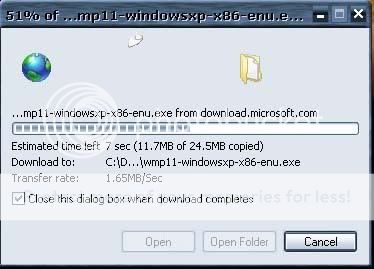
Now, whilst speedtest seem's to be the recent daddy of ADSL and cable broadband test's you can see quite clearly that it isn't.
On a 1 meg line I would see about 996 - 1000k a sec, on the 20 meg line I see 1. - 1.8 meg a second.
Now, 56k modems gave you what? 4 - 5k a sec if you was lucky.
1 meg line is about 56k k a second
2 meg line is about 128k a second
4 meg line is about 380 odd k a second
5 meg line is about 500k a second
You see the pattern here ?
As for m8y's laptop being significantly quicker then yours, what's the spec of the machine ? A fresh install of windows might generally speed things up a little, but not massive amounts.
And off microsoft :
Now, whilst speedtest seem's to be the recent daddy of ADSL and cable broadband test's you can see quite clearly that it isn't.
On a 1 meg line I would see about 996 - 1000k a sec, on the 20 meg line I see 1. - 1.8 meg a second.
Now, 56k modems gave you what? 4 - 5k a sec if you was lucky.
1 meg line is about 56k k a second
2 meg line is about 128k a second
4 meg line is about 380 odd k a second
5 meg line is about 500k a second
You see the pattern here ?
As for m8y's laptop being significantly quicker then yours, what's the spec of the machine ? A fresh install of windows might generally speed things up a little, but not massive amounts.
Thread Starter
Advanced PassionFord User
Joined: Jun 2005
Posts: 2,388
Likes: 0
From: Northern Ireland
Yeah but you see your little windows box that youve downloaded stuff on, ie this one...
Im lucky if my computer will hit 30kb/s on that... usually its around 18/20kb/s and thats off ALL websites...
Im lucky if my computer will hit 30kb/s on that... usually its around 18/20kb/s and thats off ALL websites...

Banned
Joined: Dec 2002
Posts: 142
Likes: 1
1 meg line is about 56k k a second
2 meg line is about 128k a second
4 meg line is about 380 odd k a second
5 meg line is about 500k a second
2 meg line is about 128k a second
4 meg line is about 380 odd k a second
5 meg line is about 500k a second

Bt 8Meg and im less than 2 mile's from the local exchange

Thread Starter
Advanced PassionFord User
Joined: Jun 2005
Posts: 2,388
Likes: 0
From: Northern Ireland
Im british too, ive a british passport ballbag :P NORTHERN IRELAND is part of Britain, Republic of Ireland isnt :P
Im in northern ireland
Back to topic, some fucker fix my internet or this computer is going out the cunting window.
Im in northern ireland
Back to topic, some fucker fix my internet or this computer is going out the cunting window.