


computer help


Thread Starter
I've found that life I needed.. It's HERE!!
Joined: Jun 2003
Posts: 1,464
Likes: 0
 computer help
Fookking thing
Ok this is the issue my system has slowed down and i want to wipe the lot and reload XP etc
Ok i have taken all i want of the machine and have all i need to rebuild it
i have set the boot sequence to be
IDE CDROM drive then Hard Drive
I put the XP disc in to reboot and format the jobby and it cant see it
WHen i try to explore the Disc not it just stops responding
any thoughts u PC kings
Nige
Ok this is the issue my system has slowed down and i want to wipe the lot and reload XP etc
Ok i have taken all i want of the machine and have all i need to rebuild it
i have set the boot sequence to be
IDE CDROM drive then Hard Drive
I put the XP disc in to reboot and format the jobby and it cant see it
WHen i try to explore the Disc not it just stops responding
any thoughts u PC kings
Nige
Trending Topics
Thread Starter
I've found that life I needed.. It's HERE!!
Joined: Jun 2003
Posts: 1,464
Likes: 0
nope cos then im fooked if i cant get the drives to work etc cos that has the stuff on it
I have tried a restore
I have tried to put music and stuff into the drive to see if it will start but wont
what should the settings be in the BIOS for 2 drives one a CD RW and one a DVD RW
Nige
I have tried a restore
I have tried to put music and stuff into the drive to see if it will start but wont
what should the settings be in the BIOS for 2 drives one a CD RW and one a DVD RW
Nige


Advanced PassionFord User
Joined: Aug 2004
Posts: 1,677
Likes: 0
From: great yarmouth
yeah in your startup list you should have something like this:
1.CDROM (Enabled)
2.Floppy (Enabled)
3.Harddrive (Disabled)
4.DVD (Disabled)
the cd should spin then say 'press any key' to carry on with installation
personally, i format my hard drive first, then configure bios then insert cd
1.CDROM (Enabled)
2.Floppy (Enabled)
3.Harddrive (Disabled)
4.DVD (Disabled)
the cd should spin then say 'press any key' to carry on with installation
personally, i format my hard drive first, then configure bios then insert cd


Thread Starter
I've found that life I needed.. It's HERE!!
Joined: Jun 2003
Posts: 1,464
Likes: 0
right
Now i try and use any CD or DVD in either of the drives and they wont work WHAT could cause that
This i feel is the root cause of the issue
Dave kiss my ass my Brother in law is Nevville
Now i try and use any CD or DVD in either of the drives and they wont work WHAT could cause that
This i feel is the root cause of the issue
Dave kiss my ass my Brother in law is Nevville
Advanced PassionFord User
Joined: Aug 2004
Posts: 1,677
Likes: 0
From: great yarmouth
so now the cd and dvd isnt working in the operating system or in DOS mode.
in the bios there is a section where it lists all drives, it should be on auto detect and enabled in the boot section, to been shown in windows, its hard to diagnose really, as most bios screens are different
in the bios there is a section where it lists all drives, it should be on auto detect and enabled in the boot section, to been shown in windows, its hard to diagnose really, as most bios screens are different

Thread Starter
I've found that life I needed.. It's HERE!!
Joined: Jun 2003
Posts: 1,464
Likes: 0
Ok
I can see both the drives in BIOS this is what it says
Primary Master = Hard Drive
Primary Slave = OFF
Secondary Master = CDRW
Secondary Slave = DVD RW (jumpers are set accordingly too)
IDE Drive UDMA = OFF
Is this ok so far
##Then in XP operating system
I can see both of the drives and they both have discs in but neither show ANYTHING when you try and look at them eitehr by double click or right click Search or right click explore
Nige
I can see both the drives in BIOS this is what it says
Primary Master = Hard Drive
Primary Slave = OFF
Secondary Master = CDRW
Secondary Slave = DVD RW (jumpers are set accordingly too)
IDE Drive UDMA = OFF
Is this ok so far
##Then in XP operating system
I can see both of the drives and they both have discs in but neither show ANYTHING when you try and look at them eitehr by double click or right click Search or right click explore
Nige

PassionFord Post Whore!!
Joined: Jun 2003
Posts: 3,638
Likes: 0
From: In front of computer
Try swapping the ide ribbon cables over and see if that makes a difference, incase its a fault with cable. Also try with just one drive connected. It may also be an idea to reset the bios as a last resort.

PassionFord Post Whore!!
iTrader: (4)
Joined: May 2004
Posts: 7,886
Likes: 35
From: Bangor, Northern Ireland
You could try resetting the BIOS back to standard settings, thentry running the XP disc again. Another thing to check is the actual connections inside the case - are they all correct?
PassionFord Post Whore!!
iTrader: (4)
Joined: May 2004
Posts: 7,886
Likes: 35
From: Bangor, Northern Ireland
Originally Posted by tonyk
Try swapping the ide ribbon cables over and see if that makes a difference, incase its a fault with cable. Also try with just one drive connected. It may also be an idea to reset the bios as a last resort.
lol great minds think alike!!!!

Thread Starter
I've found that life I needed.. It's HERE!!
Joined: Jun 2003
Posts: 1,464
Likes: 0
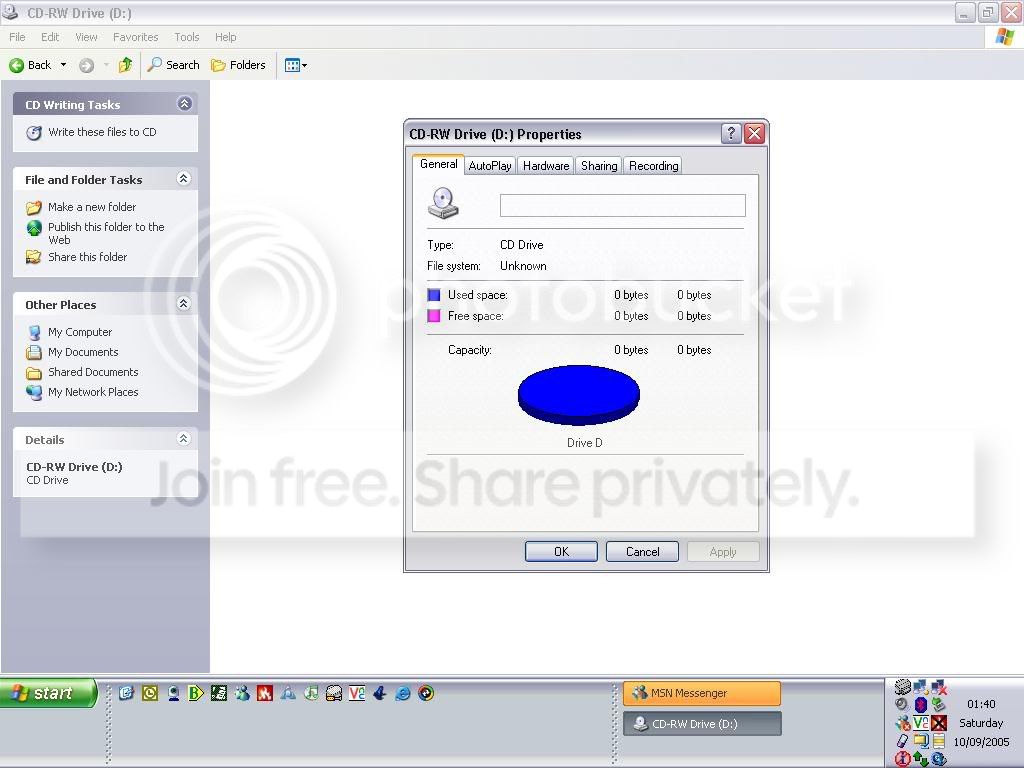
tony i have just downloaded and installed the latest BIOS flash from Dell and stuck that in , The cables seem to be fine adn have checked them this is the image i get when looking at ANY disc this one is for REM Greatest Hits
any thoughts
any thoughts

Thread Starter
I've found that life I needed.. It's HERE!!
Joined: Jun 2003
Posts: 1,464
Likes: 0
well just to confuse matters more
If i put a DVD in the DVD RW it sees it and reads it OK
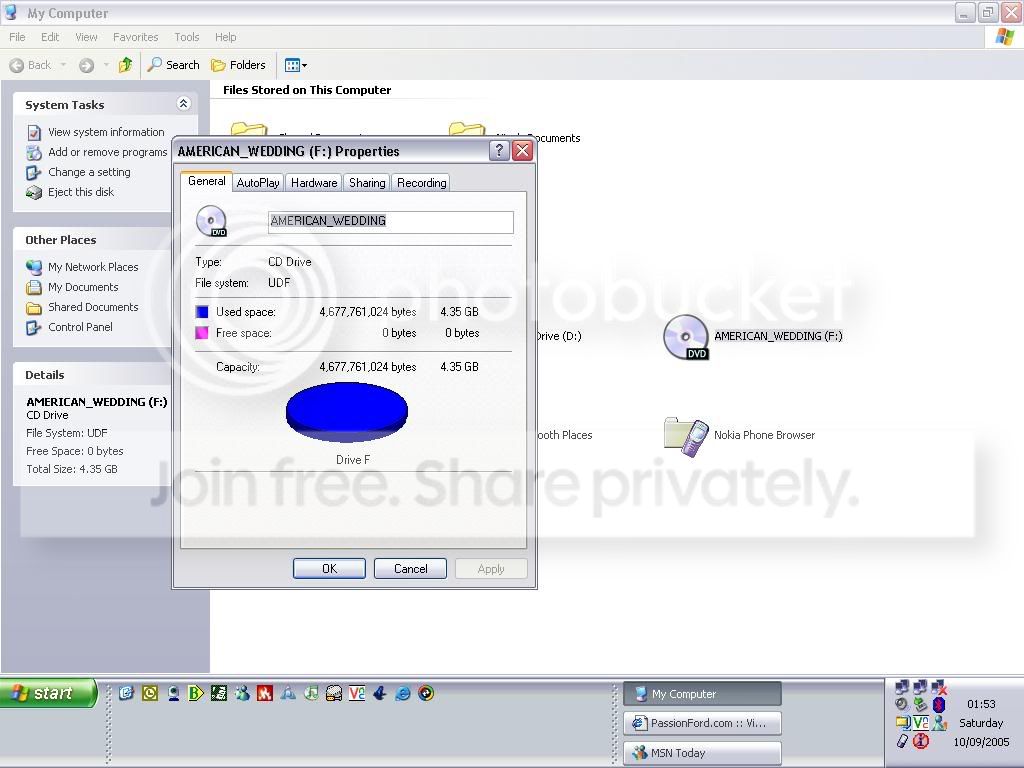
Heres the image but any other type ie CD , DAta , Software it doesnt
Whats that about
??
If i put a DVD in the DVD RW it sees it and reads it OK
Heres the image but any other type ie CD , DAta , Software it doesnt
Whats that about
??

Advanced PassionFord User
Joined: Apr 2004
Posts: 2,364
Likes: 0
Get hold of some XP boot disks and try those instead?
I'd normally suggest http://www.bootdisk.com, but I'm pretty sure they've started charging for XP boot-disks now!
I'd normally suggest http://www.bootdisk.com, but I'm pretty sure they've started charging for XP boot-disks now!
PassionFord Post Whore!!
Joined: Jun 2003
Posts: 3,638
Likes: 0
From: In front of computer
Nige when your trying to boot from the xp disc you have make sure the cd drive is disconnected on both power and ide leads. Some bios will only let you boot from the drive that is on the top end of the cable. If this drive is duff it could be locking the system up.
The last thing I would try is swapping the hard drive onto the dvd drives ide channel, this would determine if the board is duff as the hard drive wouldnt boot now.
The last thing I would try is swapping the hard drive onto the dvd drives ide channel, this would determine if the board is duff as the hard drive wouldnt boot now.
Too many posts.. I need a life!!
Joined: Jun 2005
Posts: 934
Likes: 0
From: England, Devon
If it doesn't read the disc when in xp even though xp detects the drive, then the drive is probally totalled.
They can be tempramental, like all dam computers
Try swapping over the IDE cables, try didfferent jumper setting like putting your cd drive on the same cable as the hard-drive (primary) and then change the jumpers accurdenly, try using the cable select jumper on any drive thats on its own on a cable.
If all else fails try taking the cd drive apart and clean up the laser lens and pull all the tiny cable apart and put them back somtimes they can get bad connections, be carfull though these are easy to break and easy to rip the cables, this might fix it i'ved fixed lots of things, that the cables come loose on.
They can be tempramental, like all dam computers
Try swapping over the IDE cables, try didfferent jumper setting like putting your cd drive on the same cable as the hard-drive (primary) and then change the jumpers accurdenly, try using the cable select jumper on any drive thats on its own on a cable.
If all else fails try taking the cd drive apart and clean up the laser lens and pull all the tiny cable apart and put them back somtimes they can get bad connections, be carfull though these are easy to break and easy to rip the cables, this might fix it i'ved fixed lots of things, that the cables come loose on.


Thread
Thread Starter
Forum
Replies
Last Post
nipper.1
Ford KUGA
12
May 30, 2022 07:39 PM