


PC Techies: Rebooting problem....


Thread Starter
10K+ Poster!!
Joined: May 2003
Posts: 13,421
Likes: 0
From: Speed bump central
 PC Techies: Rebooting problem....
This has been going on for a while now, my PC has been randomly rebooting mainly under load from games etc.
Ive checked all the temps and there fine, all the voltages from my power supply are fine so we did a Memory test to test the 2x 1gb RAM sticks to find one was running slower that the other and were basicly completely different!
So i though bollox to all this messing about with cheap RAM and went and bought 2x matched pair corsair platinum 1gb sticks and threw them in, all seemed well until lastnight it rebooted again
Anything else i can do before it goes through the window?
PC spec:
ASRock K8NF4G-SATA2 Motherboard
AMD 3200+ 64
256mb Nvidia 7800GTX
Coolermaster 550w PSU
Sound blaster Audigy 7.1
2x 1gb Corsair platinum
160GB HDD
thats about it.
Ive checked all the temps and there fine, all the voltages from my power supply are fine so we did a Memory test to test the 2x 1gb RAM sticks to find one was running slower that the other and were basicly completely different!
So i though bollox to all this messing about with cheap RAM and went and bought 2x matched pair corsair platinum 1gb sticks and threw them in, all seemed well until lastnight it rebooted again
Anything else i can do before it goes through the window?
PC spec:
ASRock K8NF4G-SATA2 Motherboard
AMD 3200+ 64
256mb Nvidia 7800GTX
Coolermaster 550w PSU
Sound blaster Audigy 7.1
2x 1gb Corsair platinum
160GB HDD
thats about it.

15000
Joined: May 2004
Posts: 41
Likes: 0
From: Haywards Heath West SUssex
when it boots back up does it say anything about having encountered a serious error, i have problems with my pc graphics card locking out some times and the computer reboots itself? are the games ur playing quite graphic intense if u know what i mean?
Thread Starter
10K+ Poster!!
Joined: May 2003
Posts: 13,421
Likes: 0
From: Speed bump central
Originally Posted by thegrimreaper
when it boots back up does it say anything about having encountered a serious error?
Originally Posted by thegrimreaper
are the games ur playing quite graphic intense if u know what i mean?
15000
Joined: May 2004
Posts: 41
Likes: 0
From: Haywards Heath West SUssex
aagh right bf2 eh! sposed to be a good game! going to go and get that next week my mate plays in a clan and he swears its excellent, anyway back to the topic! my graphics card is a nightmare keeps locking out and says signal out of range, i think if u view that report it will tell u the filename that caused the pc to lock out! then google that filename it may help u to find out the cause!
Andy
Andy

Advanced PassionFord User
Joined: May 2004
Posts: 1,732
Likes: 0
if its rebooting while playing games etc then its most likely going to be a overheating issue, as thats the pc's fail safe once it hits a certain temperature.
get yourself a compressed air spray can and clean your case/fans/ everything out, if your graphics card has a fan then clean all that out as well.
this is well worth doing on a regular basis as its a major cause of over heating.
get yourself a compressed air spray can and clean your case/fans/ everything out, if your graphics card has a fan then clean all that out as well.
this is well worth doing on a regular basis as its a major cause of over heating.

Too many posts.. I need a life!!
Joined: Jun 2004
Posts: 712
Likes: 0
Originally Posted by FastFordChris
if its rebooting while playing games etc then its most likely going to be a overheating issue, as thats the pc's fail safe once it hits a certain temperature.
get yourself a compressed air spray can and clean your case/fans/ everything out, if your graphics card has a fan then clean all that out as well.
this is well worth doing on a regular basis as its a major cause of over heating.
get yourself a compressed air spray can and clean your case/fans/ everything out, if your graphics card has a fan then clean all that out as well.
this is well worth doing on a regular basis as its a major cause of over heating.
After you have cleaned all your fans id check that the heatsinks are seated properly on both cpu & gfx card and check what temp your motherboard resets the PC at as this might be set a touch too low.
Let us know how it goes
Thread Starter
10K+ Poster!!
Joined: May 2003
Posts: 13,421
Likes: 0
From: Speed bump central
Ive done all the heat related checks, motherboard temp peaks at 35c and the CPU peaks at 55c under load.
I belive the CPU shuts down at 60c so thats fine, basicly it pauses during
gameplay for a few seconds, then reboots
I belive the CPU shuts down at 60c so thats fine, basicly it pauses during
gameplay for a few seconds, then reboots
Trending Topics


Thread Starter
10K+ Poster!!
Joined: May 2003
Posts: 13,421
Likes: 0
From: Speed bump central
Originally Posted by DanRSturbo
Try it with the side of the case off. If that cures it you have a over heating issue.
I would also reinstall windows and then install the games to test
I would also reinstall windows and then install the games to test


10K+ Poster!!
Joined: May 2003
Posts: 10,089
Likes: 2
From: Handcuffed to the Mrs' Bed ;-)
Then, i would throw in some extra fan's in the case like I have

This is an old pic, now I have the black extractor fan sitting below the graphics card. The graphics card fan blows air off the card, onto the extractor fan, and out the back off the case.
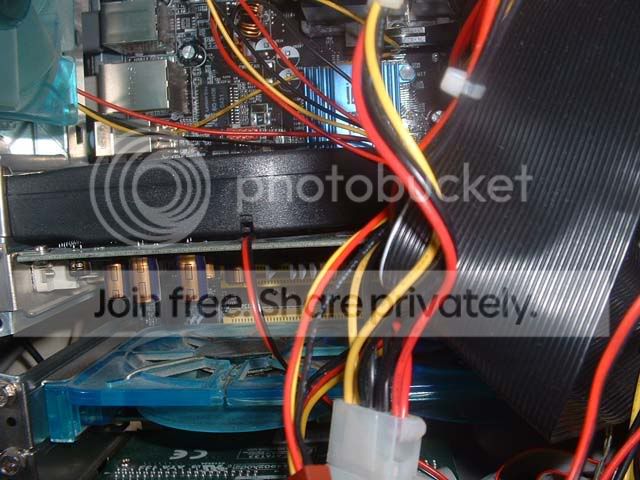
This is an old pic, now I have the black extractor fan sitting below the graphics card. The graphics card fan blows air off the card, onto the extractor fan, and out the back off the case.


PassionFord Post Whore!!
Joined: May 2003
Posts: 7,757
Likes: 0
From: Norwich, Norfolk, UK
Its going to be heat related somewhere.
I had the same issues a few years back.
Took side of PC and ran a fan directly into it and it stopped rebooting.
Ended up buying 3 extra fans for inside the box, 2 extra in the case and 2 extractors.
Think it ran at something like 25C on full load.
I had the same issues a few years back.
Took side of PC and ran a fan directly into it and it stopped rebooting.
Ended up buying 3 extra fans for inside the box, 2 extra in the case and 2 extractors.
Think it ran at something like 25C on full load.

Thread
Thread Starter
Forum
Replies
Last Post
Jasesapphy
General Car Related Discussion.
5
Dec 24, 2005 09:56 PM
andre_k
General Car Related Discussion.
3
Sep 28, 2005 05:07 PM