posting my pics


Thread Starter
Too many posts.. I need a life!!
Joined: Sep 2008
Posts: 968
Likes: 0
From: kent
 posting my pics
When i start a new thread or post a reply to someone i am unable to post a pic of my car and the work i am doing on it. They are in an album on here, i just cant post them. Some help would be great.

BANNED
Joined: Aug 2004
Posts: 5,249
Likes: 0
From: The beach
How I did that:
1) Went to your picture
2) Right click, then properties
3) Copy the Location (should be top of box, make sure you scroll all the way across) should look like this: https://passionford.com/forum/pictur...pictureid=2258
4) Paste it into here, but at either end (and with no spaces) I added [IMG] your pasted picture data here [/IMG]
5) Pic should show

There might be an easier way to get them to display, but Im not sure as I dont have any pictures on here, I use photobucket which provides the [IMG] tags for you.
Hope this helps mate

Steve
Last edited by SteveH; Jan 12, 2009 at 06:31 PM. Reason: add text
BANNED
Joined: Aug 2004
Posts: 5,249
Likes: 0
From: The beach
hmm im not sure about your problem, like I say I dont have my images on passionford. Does it display a little red X in a box where your image is supposed to be?
the way I explained is detailed above.
Have a practice in this thread mate.
the way I explained is detailed above.
Have a practice in this thread mate.
Thread Starter
Too many posts.. I need a life!!
Joined: Sep 2008
Posts: 968
Likes: 0
From: kent
yes it does display a red x in a box is that where i am going wrong?
BANNED
Joined: Aug 2004
Posts: 5,249
Likes: 0
From: The beach
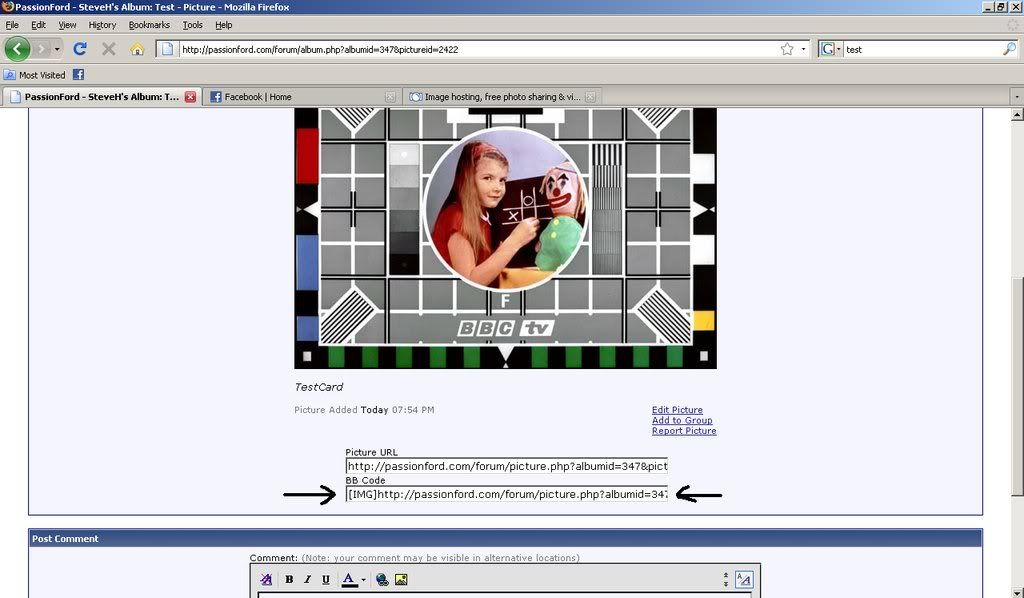
Think Ive got it, I have uploaded the BBC test card to my album, which should display below:

When you look through your album, it should have 2 boxes under each image, one will be labeled URL: and one will be BB Code which has the [IMG] tags alreay on it, try copy and pasting the BB Code into your reply and see if that works Matt
When you look through your album, it should have 2 boxes under each image, one will be labeled URL: and one will be BB Code which has the [IMG] tags alreay on it, try copy and pasting the BB Code into your reply and see if that works Matt