


.....:: SPYWARE ::.....


Thread Starter
PassionFords Creator
iTrader: (12)
Joined: May 2003
Posts: 28,824
Likes: 95
From: Blackpool, UK Destination: Rev limiter
 .....:: SPYWARE ::.....
If you dont regularly scan for spyware, do so now as it can:
A) Cause lots of speed problems.
B) Cause PC problems
C) Create adverts and pop ups on your pc.
D) Send out your bank details etc etc..
A good scanner can fix LOADS of little problems on your pc and make your data more secure:
I use this normally:
http://www.lavasoftusa.com/software/adaware/
Download it here:
http://www.download.com/3000-2144-10...age&tag=button
REMEMBER TO USE THE UPDATE DATABASE OPTION BEFORE SCANNING.
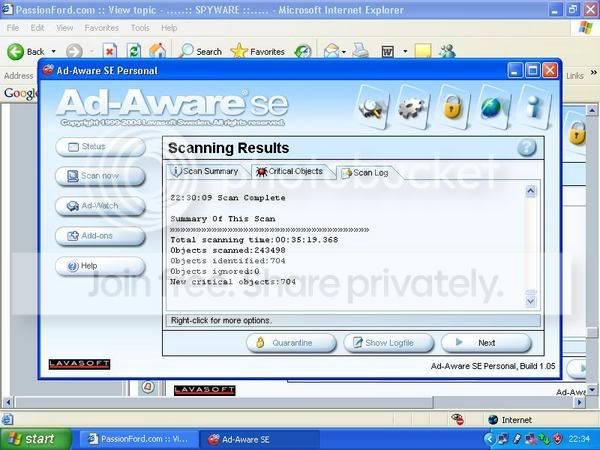
Prize for the one with most spyware on his machine, i guarantee some of you will have 1000,s of seperate spy programs!! (With screenshot to prove )

A) Cause lots of speed problems.
B) Cause PC problems
C) Create adverts and pop ups on your pc.
D) Send out your bank details etc etc..
A good scanner can fix LOADS of little problems on your pc and make your data more secure:
I use this normally:
http://www.lavasoftusa.com/software/adaware/
Download it here:
http://www.download.com/3000-2144-10...age&tag=button
REMEMBER TO USE THE UPDATE DATABASE OPTION BEFORE SCANNING.
Prize for the one with most spyware on his machine, i guarantee some of you will have 1000,s of seperate spy programs!! (With screenshot to prove )


Trending Topics




PassionFord Post Whore!!
Joined: Dec 2002
Posts: 6,013
Likes: 0
From: Toulon, France
a very good one, much more powerful in some cases, is Spy Sweeper. Download it here : www.webroot.com




Banned
Joined: Dec 2002
Posts: 142
Likes: 1
I've seen 930 on a system before with Ad-Aware. Wouldn't do anything 
Posted before but also run this, http://cleanup.stevengould.org/
Great little program
Posted before but also run this, http://cleanup.stevengould.org/
Great little program

Advanced PassionFord User
Joined: May 2003
Posts: 2,376
Likes: 0
From: Beds
Originally Posted by RSOrionKim
Taking ages for it to dowload so I stopped it, how long did it take for you guys 

Soz couldnt resist

Steve

Advanced PassionFord User
Joined: May 2003
Posts: 2,376
Likes: 0
From: Beds
Did a fresh install from format followed by adaware nothing else just them two, still found 3 pieces, add office will get a few more, windows auto time update yep another few lol etc etc
They the reputable type software and places, god I feel sorry for all u lot that go pervin every where 
Steve
They the reputable type software and places, god I feel sorry for all u lot that go pervin every where
Steve



PassionFord Post Whore!!
Joined: May 2003
Posts: 7,757
Likes: 0
From: Norwich, Norfolk, UK
I have 0 on mine now. Only done it at about 7pm tonight
Done 2 machines at work a few months ago and totalled 20k+
Was easier to reinstall software on machines and start again.
Done 2 machines at work a few months ago and totalled 20k+
Was easier to reinstall software on machines and start again.



Advanced PassionFord User
Joined: May 2003
Posts: 2,376
Likes: 0
From: Beds
U r obviously aware these progs DONT actually remove all traces of adware, if u know what folders u got installed on your pc heps cause u can spot the ones it says it removes but dont, also have a look in your startup options with msconfig to stop em reinfecting as soon as u reboot, and r even some u have to start your pc in safe mode to delete there folders and files 
But obviously better than doing nothing at all
Steve
But obviously better than doing nothing at all
Steve
Advanced PassionFord User
Joined: May 2003
Posts: 2,376
Likes: 0
From: Beds
Soz dont mean it dont get rid of any of it, meant there are some that are harder to get rid of than others the progs stated will get totally rid of 99% of the shit, just a few stubburn ones out there,
or am i giving away to much about the sites I visit
or am i giving away to much about the sites I visit

Professional Waffler


Joined: May 2003
Posts: 25,714
Likes: 129
From: south yorkshire
your right rapid one. 2 weeks ago pc was shit, and i noticed some odd programs that had been installed. I posted on here about it and got help. Was told to DL spybot. I did and it found 15 spyware, and 4 virus's that had got past enoculate!!!!
Cool i thought till i rebooted and the programs were still there. I had to delete em every time i booted up or my pc was slow. Im due another pc of bro in law so though fook em.....till 2 nite when i saw this thread....and found over 800 of the fookers. Those programs have gone and pc is fast as fook!!!
Cool i thought till i rebooted and the programs were still there. I had to delete em every time i booted up or my pc was slow. Im due another pc of bro in law so though fook em.....till 2 nite when i saw this thread....and found over 800 of the fookers. Those programs have gone and pc is fast as fook!!!
Advanced PassionFord User
Joined: May 2003
Posts: 2,376
Likes: 0
From: Beds
I run as stated here Adaware with adwatch always running, now that has some powerfull stoppers in it, but also stops aload of stuff u may want like even when installing progs it stops changes to the regestry install on demand on the net where sometimmes u may want or need it if just left in auto (I got mine set to manual so it asks me most times what i want to do, now i dont make out I know alot about pc's but a little and it hard to know what to stop or what to allow, generally just take it as if i am doing something then it probs ok to allow it )
At same time got spysweeper running in background as well which seems to get a few ikle Trojans that adwatch misses for some reason
Also Avast anti virus
Tis like world war 3 when something hits my pc bells and whistles everywhere lol, but could have been clean the night b4 get warned of one, do the in depth scans and end up finding another 100 there and others still attacking as u cleaning (avast shows this best as it warns" warning system affected by virus" repeatedly)
If poss, disconnect from internet at first warning then scan and clean.
Oh the one that makes me laugh is when spysweeper finds its own update "trojan" and recomends u keep it lol.
Not sure I 100% agree with Stu that these things send credit card details about, think there would be more made of it, cause if it was happening there would be reasons why and them reasons obviously wouldnt be good and chances are that peoples money would be going missing and sure people would notice that and like I said it would become more public knowledge dont think banks who ever would be able to keep it quiet if the net encryption was that weak but only imo
Also tho how much do these trojans actually slow pc's down compared to all the anti's that have to constantly keep scanning mem and discs
makes u wonder if it really worth stopping em
Personally dont like the idea of being invaded
so do my best to stop em.
Steve
)At same time got spysweeper running in background as well which seems to get a few ikle Trojans that adwatch misses for some reason
Also Avast anti virus
Tis like world war 3 when something hits my pc bells and whistles everywhere lol, but could have been clean the night b4 get warned of one, do the in depth scans and end up finding another 100 there and others still attacking as u cleaning (avast shows this best as it warns" warning system affected by virus" repeatedly)
If poss, disconnect from internet at first warning then scan and clean.
Oh the one that makes me laugh is when spysweeper finds its own update "trojan" and recomends u keep it lol.
Not sure I 100% agree with Stu that these things send credit card details about, think there would be more made of it, cause if it was happening there would be reasons why and them reasons obviously wouldnt be good and chances are that peoples money would be going missing and sure people would notice that and like I said it would become more public knowledge dont think banks who ever would be able to keep it quiet if the net encryption was that weak
but only imoAlso tho how much do these trojans actually slow pc's down compared to all the anti's that have to constantly keep scanning mem and discs
makes u wonder if it really worth stopping em
Personally dont like the idea of being invaded
so do my best to stop em.
Steve

Too many posts.. I need a life!!
Joined: Jul 2003
Posts: 575
Likes: 1
From: Aberdeen, Scotland
Microsoft is currently beta testing its on spyware removal tool, I find it to be pretty good and gets rid of stuff that Ad-aware can struggle with 
This alert is to make you aware of the public availability of a beta version of Microsoft Windows AntiSpyware. This beta version is available at the following location:
http://www.microsoft.com/athome/secu...e/default.mspx
Support for Beta of Microsoft Windows AntiSpyware
At this time, support for the beta version of Microsoft Windows AntiSpyware is being provided through the following Microsoft newsgroups:
- microsoft.private.security.spyware.announcements
- microsoft.private.security.spyware.appcompat
- microsoft.private.security.spyware.general
- microsoft.private.security.spyware.install
- microsoft.private.security.spyware.networking
- microsoft.private.security.spyware.signatures
- microsoft.private.security.spyware.onlinecommunity
These newsgroups can be accessed via NNTP or HTTP.
To access these newsgroups using HTTP, please go to the following location: http://communities.microsoft.com/new...yware&sLCID=us
To access these newsgroups using NNTP, please use the following information for your NNTP client (such as Microsoft Outlook Express):
- NNTP Server: privatenews.microsoft.com
- Account name: privatenews\spyware
- Password: spyware
NOTE: No password will be required via the HTTP link
Objective Spyware Criteria and Vendor Dispute Information
Information about the criteria that is part of a scoring system that determines whether a program is added for detection is available at this location: http://www.spynet.com/info_spywarecriteria.aspx
Vendors of products that are detected who feel the listing in the library is incorrect should fill out the request form located at this location: http://www.spynet.com/vendors.aspx
Announcement of Upcoming Release of Malicious Software Removal Tools
Starting from January 11th, 2005, Microsoft will provide Windows customers with Malicious Software Removal Tools. New versions of these tools will be available monthly (second Tuesday of every month on the same schedule that Microsoft already delivers other security updates) or more frequently if necessary.
These removal tools are an extension of virus or worm specific removal tools that Microsoft released in 2004. While tools released in 2004 have been specific to a single virus (and some of its variants), the new removal tools provide more convenience for customers by rolling up all viruses and variants targeted into a common removal tool.
Microsoft will provide new versions of this tool updated to remove malicious software that is found to be prevalent for that month. The first version of the tool available in January will be able to remove Blaster, Sasser, MyDoom, DoomJuice, Zindos, Berweb (also known as Download.Ject), Gailbot and Nachi viruses / worms.
These removal tools will be made available to customers through the following delivery vehicles:
- As a download through the Microsoft Download Center
- As a critical update through Windows Update and through Auto Update for those customers who have Auto Update turned on
- As an ActiveX control also available at www.microsoft.com/malwareremove
Additional Information
For additional information about today's announcements regarding Microsoft Windows AntiSpyware and Microsoft Malicious Software Removal Tools, please see the public press release located here: http://www.microsoft.com/presspass/p...olutionsPR.asp
For additional, general information about Microsoft Windows AntiSpyware and Microsoft's acquisition of Giant Company, please see the public press release located here: http://www.microsoft.com/presspass/p...-16GIANTPR.asp
This alert is to make you aware of the public availability of a beta version of Microsoft Windows AntiSpyware. This beta version is available at the following location:
http://www.microsoft.com/athome/secu...e/default.mspx
Support for Beta of Microsoft Windows AntiSpyware
At this time, support for the beta version of Microsoft Windows AntiSpyware is being provided through the following Microsoft newsgroups:
- microsoft.private.security.spyware.announcements
- microsoft.private.security.spyware.appcompat
- microsoft.private.security.spyware.general
- microsoft.private.security.spyware.install
- microsoft.private.security.spyware.networking
- microsoft.private.security.spyware.signatures
- microsoft.private.security.spyware.onlinecommunity
These newsgroups can be accessed via NNTP or HTTP.
To access these newsgroups using HTTP, please go to the following location: http://communities.microsoft.com/new...yware&sLCID=us
To access these newsgroups using NNTP, please use the following information for your NNTP client (such as Microsoft Outlook Express):
- NNTP Server: privatenews.microsoft.com
- Account name: privatenews\spyware
- Password: spyware
NOTE: No password will be required via the HTTP link
Objective Spyware Criteria and Vendor Dispute Information
Information about the criteria that is part of a scoring system that determines whether a program is added for detection is available at this location: http://www.spynet.com/info_spywarecriteria.aspx
Vendors of products that are detected who feel the listing in the library is incorrect should fill out the request form located at this location: http://www.spynet.com/vendors.aspx
Announcement of Upcoming Release of Malicious Software Removal Tools
Starting from January 11th, 2005, Microsoft will provide Windows customers with Malicious Software Removal Tools. New versions of these tools will be available monthly (second Tuesday of every month on the same schedule that Microsoft already delivers other security updates) or more frequently if necessary.
These removal tools are an extension of virus or worm specific removal tools that Microsoft released in 2004. While tools released in 2004 have been specific to a single virus (and some of its variants), the new removal tools provide more convenience for customers by rolling up all viruses and variants targeted into a common removal tool.
Microsoft will provide new versions of this tool updated to remove malicious software that is found to be prevalent for that month. The first version of the tool available in January will be able to remove Blaster, Sasser, MyDoom, DoomJuice, Zindos, Berweb (also known as Download.Ject), Gailbot and Nachi viruses / worms.
These removal tools will be made available to customers through the following delivery vehicles:
- As a download through the Microsoft Download Center
- As a critical update through Windows Update and through Auto Update for those customers who have Auto Update turned on
- As an ActiveX control also available at www.microsoft.com/malwareremove
Additional Information
For additional information about today's announcements regarding Microsoft Windows AntiSpyware and Microsoft Malicious Software Removal Tools, please see the public press release located here: http://www.microsoft.com/presspass/p...olutionsPR.asp
For additional, general information about Microsoft Windows AntiSpyware and Microsoft's acquisition of Giant Company, please see the public press release located here: http://www.microsoft.com/presspass/p...-16GIANTPR.asp


Too many posts.. I need a life!!
Joined: May 2004
Posts: 695
Likes: 0
From: On your IPC$
Here you have a scoop on PF..
The allnew MICROSOFT antispyware tool ...
it actually works good.. but thats probably because they bought the company that made it
However.. its not in the press (yet).. and its Beta version..
but here you can download it
http://www.microsoft.com/downloads/d...DisplayLang=en
The allnew MICROSOFT antispyware tool ...
it actually works good.. but thats probably because they bought the company that made it
However.. its not in the press (yet).. and its Beta version..
but here you can download it
http://www.microsoft.com/downloads/d...DisplayLang=en