


Watching movies from PC on TV......


Thread Starter
Joined: May 2003
Posts: 23,329
Likes: 6
From: Norfolk
 Watching movies from PC on TV......
I would like to connect my PC to the TV. The PC has lots of connectivity on the front, such as S-Video and Composite etc.
We have an Amp for the TV sound, so what would have to be connected to what?
Do I need an S-Video to S-Video lead from the PC to the TV for the picture and Composite to Composite to the Amp for the sound?
We have an Amp for the TV sound, so what would have to be connected to what?
Do I need an S-Video to S-Video lead from the PC to the TV for the picture and Composite to Composite to the Amp for the sound?

PassionFord Post Whore!!


Joined: May 2003
Posts: 9,608
Likes: 45
From: Bristol
Neither of those carry sound, and s-vid will be the better picture.
For the sound you need a lead to plug in to the PC where you would normally put speakers, or the line out if you have it, and 2 phono's on the other end to connect to the amp.
HTH
For the sound you need a lead to plug in to the PC where you would normally put speakers, or the line out if you have it, and 2 phono's on the other end to connect to the amp.
HTH
Thread Starter
Joined: May 2003
Posts: 23,329
Likes: 6
From: Norfolk
OK, I have several connectors on the front, but just normal headphone style jack plugs.
However, I have just spotted a 'Digital Audio In & Out' connection point on the rear of the tower. Those any good? Each is a single Phono style plug.
However, I have just spotted a 'Digital Audio In & Out' connection point on the rear of the tower. Those any good? Each is a single Phono style plug.


PassionFord Post Whore!!
Joined: Jun 2003
Posts: 3,638
Likes: 0
From: In front of computer
As said above regarding digital connections. If your amp does not have these you can buy a cable that goes from the headphone socket into red & white phono plugs. This will only give you stereo sound. The digital method should give you 5.1 surround.

Joined: May 2003
Posts: 21,268
Likes: 147
From: The Dark Side of the Moon...
Christian, first you need to see what the connections on the front are - inputs or outputs.... If outputs, when you right click on the desktop and choose PROPERTIES and go to SETTINGS, you should see two screens listed - one of these should be the analog output (s-vid or composite)
If you amp has video switching (as in, if it's an AV Reciever) it will most likely have composite and svideo inputs on it, so you should be able to plug into that, tho you will need a second lead to run from the AVR to the TV - so unless you are plugging in a few source devices through the amp, it will probably be easier to connect the PC directly to the TV. You will need a seperate audio connection from the PC to the amp. Not knowing what your soundcard is, typical output is a 3.5mm stereo jack (for 2ch left and right speakers), so use a 3.5mm stereo to twin RCA cable and hook it into your amp.
Now, not knowing what TV you have makes it hard to say what quality you will get. My TV is CRT, so I have to connect via S-Vid to it as it only has analogue inputs, and as such, the quality of "computer" stuff is awfull! S-vid, as far as I know, only allows a maximum of 1024x768 resolution (which is 4:3, like a typical "square" pc monitor), and will also do 640x420 (4:3) and 800x600 (also 4:3). As far as I know s-video doesn't support a 16:9 widescreen res (such as 1280x720) from computers. This *might* depend on your PC's graphics card and your TV of course!
If your TV is a digital TV (LCD or plasma) I would be tempted to use a digital connection - such as VGA or DVI. VGA (the blue 15pin connection) is actually analogue RGB, but is treated like a digital connection for use with TFT monitors, and LCD and plasma screens. DVI is a fully digital connection. Both will do full 16:9 widescreen resolutions, the pixel size of which depends on your TV. It will also give a FAR sharper picture meaning you will be able to read web pages, menu's etc.
If you amp has video switching (as in, if it's an AV Reciever) it will most likely have composite and svideo inputs on it, so you should be able to plug into that, tho you will need a second lead to run from the AVR to the TV - so unless you are plugging in a few source devices through the amp, it will probably be easier to connect the PC directly to the TV. You will need a seperate audio connection from the PC to the amp. Not knowing what your soundcard is, typical output is a 3.5mm stereo jack (for 2ch left and right speakers), so use a 3.5mm stereo to twin RCA cable and hook it into your amp.
Now, not knowing what TV you have makes it hard to say what quality you will get. My TV is CRT, so I have to connect via S-Vid to it as it only has analogue inputs, and as such, the quality of "computer" stuff is awfull! S-vid, as far as I know, only allows a maximum of 1024x768 resolution (which is 4:3, like a typical "square" pc monitor), and will also do 640x420 (4:3) and 800x600 (also 4:3). As far as I know s-video doesn't support a 16:9 widescreen res (such as 1280x720) from computers. This *might* depend on your PC's graphics card and your TV of course!
If your TV is a digital TV (LCD or plasma) I would be tempted to use a digital connection - such as VGA or DVI. VGA (the blue 15pin connection) is actually analogue RGB, but is treated like a digital connection for use with TFT monitors, and LCD and plasma screens. DVI is a fully digital connection. Both will do full 16:9 widescreen resolutions, the pixel size of which depends on your TV. It will also give a FAR sharper picture meaning you will be able to read web pages, menu's etc.
Trending Topics
Joined: May 2003
Posts: 21,268
Likes: 147
From: The Dark Side of the Moon...
Ah, more replies I see whilst I typed mine 
Yes, as I said the 3.5mm jack output will output stereo only, and as said the digital output will output multichannel digital audio - but this is dependant on a) what soundcard software you use, and b) what video player software you use!
For example, a DVD rip or AVI will multichannel audiotrack (such as Dolby Digital 5.1) played in Windows Media Player will not output multichannel audio. But use a player like Media Player Classic, Zoomplayer or VLC, and after configuring it correctly you will be able to pass through multichannel audio from the film to the amp with no loss - the amp then decodes the bitstream and you get your 5.1 Dolby Digital or DTS. This is how mine is set up (although I use optical, the principal and practice is the same)
Oh, and SVHS was a (now defunct) format, not a cable. S-Video is not SVHS. Common misconception
Yes, as I said the 3.5mm jack output will output stereo only, and as said the digital output will output multichannel digital audio - but this is dependant on a) what soundcard software you use, and b) what video player software you use!
For example, a DVD rip or AVI will multichannel audiotrack (such as Dolby Digital 5.1) played in Windows Media Player will not output multichannel audio. But use a player like Media Player Classic, Zoomplayer or VLC, and after configuring it correctly you will be able to pass through multichannel audio from the film to the amp with no loss - the amp then decodes the bitstream and you get your 5.1 Dolby Digital or DTS. This is how mine is set up (although I use optical, the principal and practice is the same)
Oh, and SVHS was a (now defunct) format, not a cable. S-Video is not SVHS. Common misconception
Thread Starter
Joined: May 2003
Posts: 23,329
Likes: 6
From: Norfolk
Fuck you know your stuff Thrush. 
Right, here's what I have on my PC......
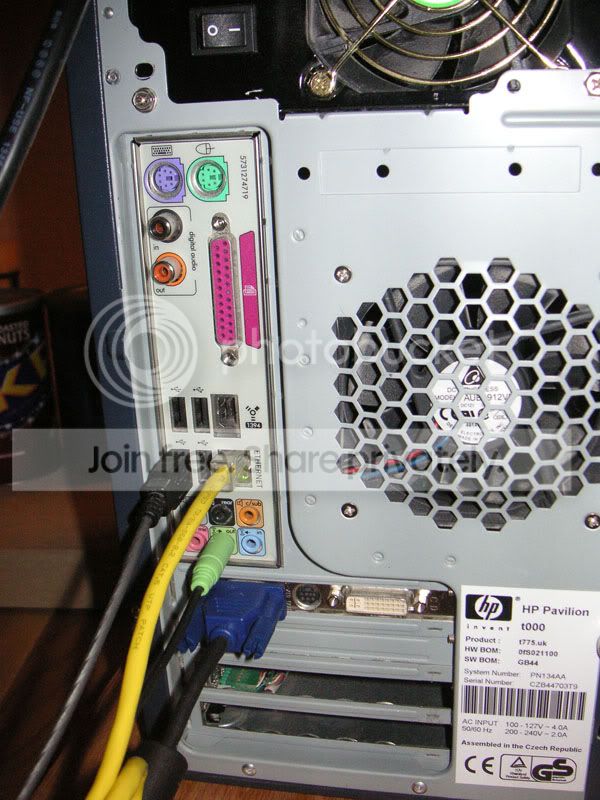
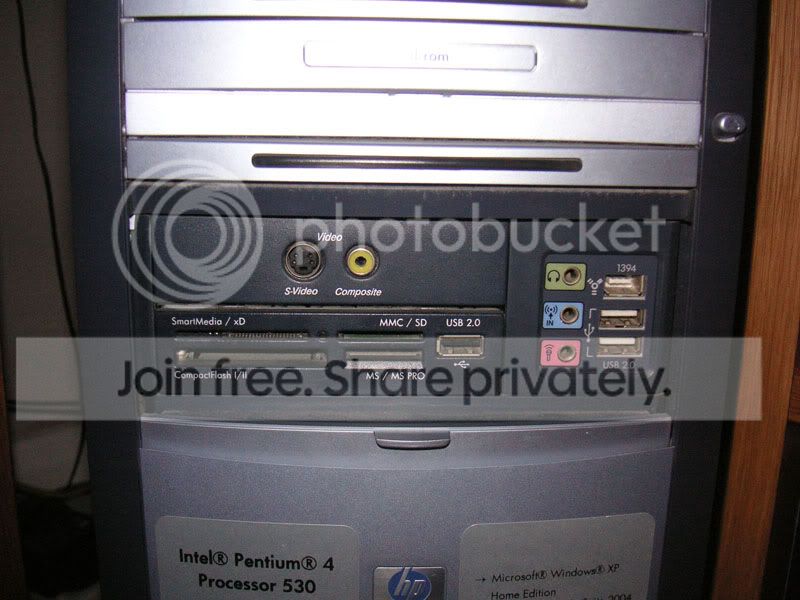
As you can see, the card where my PC Monitor connects also has an S-Video Connection and a DVI (??) connection. You can also see the Digital Audio connection points near the top of the board. Yah?
The front is fairly self-explainatory.
The Amp is an Onkyo SR674 and has this on the front.....
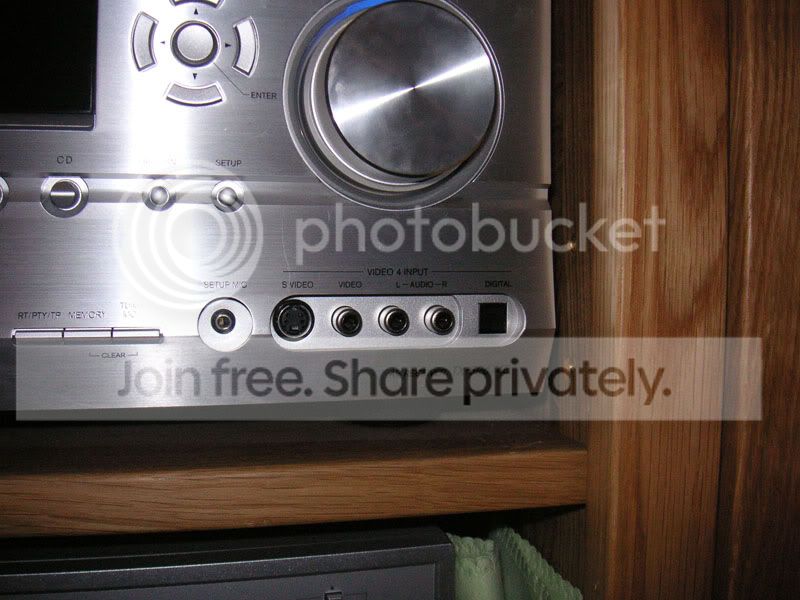
There is masses of stuff on the back, but it's a proper arse to get to now so, I'm hoping I can do this with what I have on the front.
The TV is a 32" LG 32LB1D LCD. It has lots of connectivity....
This panel is closest to the PC (so is favourite)
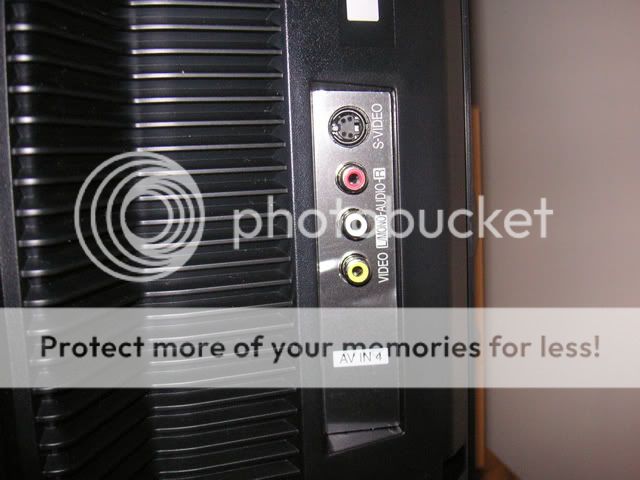
Followed by this one.....(I currently have the on-screen display connection from the Amp connected to the Yellow Video connection on the AV3 panel)
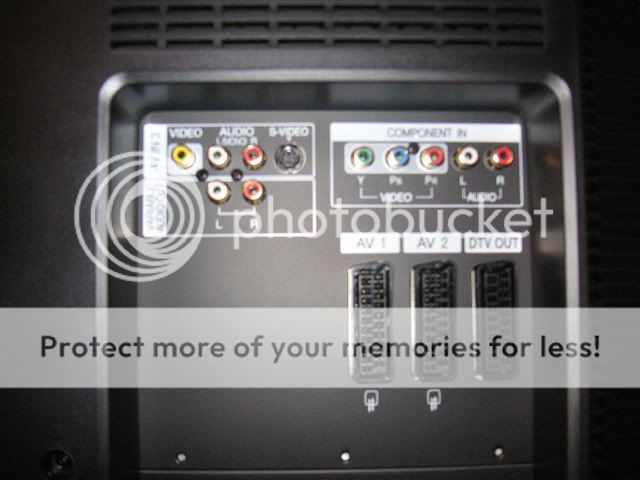
But also, there's these.....
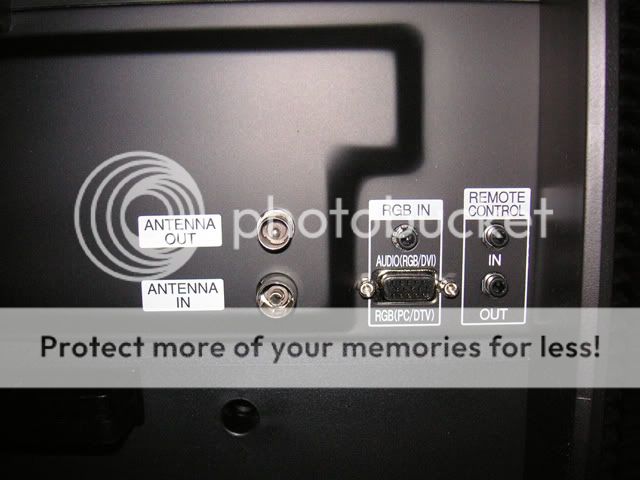
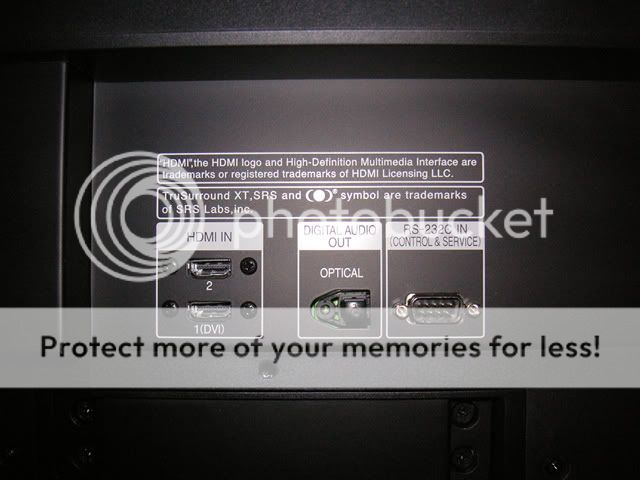
The TV is about 2-2.5 metres from the PC. This is not something I'd want to use often, but hoping to have the leads coiled up behind the TV, then run them across to the PC when needed.
So, whats next!!??!!
Right, here's what I have on my PC......
As you can see, the card where my PC Monitor connects also has an S-Video Connection and a DVI (??) connection. You can also see the Digital Audio connection points near the top of the board. Yah?
The front is fairly self-explainatory.
The Amp is an Onkyo SR674 and has this on the front.....
There is masses of stuff on the back, but it's a proper arse to get to now so, I'm hoping I can do this with what I have on the front.
The TV is a 32" LG 32LB1D LCD. It has lots of connectivity....
This panel is closest to the PC (so is favourite)
Followed by this one.....(I currently have the on-screen display connection from the Amp connected to the Yellow Video connection on the AV3 panel)
But also, there's these.....
The TV is about 2-2.5 metres from the PC. This is not something I'd want to use often, but hoping to have the leads coiled up behind the TV, then run them across to the PC when needed.
So, whats next!!??!!

Thread Starter
Joined: May 2003
Posts: 23,329
Likes: 6
From: Norfolk
PassionFord Post Whore!!
Joined: May 2003
Posts: 9,608
Likes: 45
From: Bristol
RGB in on the TV, every time. You can use that DVI output, and run the TV as a second monitor.
Your digital audio in on the front of the amp is optical, so not compatible with the digital coax out from your PC.
Two options:
1) Look on the back of the amp for a digital coax in (same as PC) - best option.
2) Use the 2 channel (L/R) inputs on the front of your amp and a 3.5mm output from the PC.
Depending on your amp, you might still be able to make all 6 speakers work, but it will only be stereo, not 5.1
Your digital audio in on the front of the amp is optical, so not compatible with the digital coax out from your PC.
Two options:
1) Look on the back of the amp for a digital coax in (same as PC) - best option.
2) Use the 2 channel (L/R) inputs on the front of your amp and a 3.5mm output from the PC.
Depending on your amp, you might still be able to make all 6 speakers work, but it will only be stereo, not 5.1
Thread Starter
Joined: May 2003
Posts: 23,329
Likes: 6
From: Norfolk
I dread pulling that Amp out!! It's location doesn't make it very easy to get to the back!! Oh well, I suppose I can plug the lead in and coil it up beside the Amp!!
PassionFord Post Whore!!
Joined: Jun 2003
Posts: 3,638
Likes: 0
From: In front of computer
Originally Posted by Christian and Beccy
Oh, BTW, I have Windows Media Player, but usually use VLC.
Took a while to type this, so probably beat to the punch!
Joined: May 2003
Posts: 21,268
Likes: 147
From: The Dark Side of the Moon...
Right, here's what I would do;
1/ Use ONE OF THESE CABLES to connect your PC's DVI port (white one next to the blue VGA on the back) to the HDMI input on the back, marked "1(DVI)"
2/ Use ONE OF THESE CABLES to connect from the DIGITAL OUT on the back of your PC to a digital input on your Onkyo
3/ Use VLC (or Media Player Classic in conjunction with CCCP, or Zoomplayer - which lately I prefer to both - no idea if it responds to the remote control like MCE does) to play movies, and PM me if you don't get any 5.1 audio from it as I may be able to help you change the settings so you do
1/ Use ONE OF THESE CABLES to connect your PC's DVI port (white one next to the blue VGA on the back) to the HDMI input on the back, marked "1(DVI)"
2/ Use ONE OF THESE CABLES to connect from the DIGITAL OUT on the back of your PC to a digital input on your Onkyo
3/ Use VLC (or Media Player Classic in conjunction with CCCP, or Zoomplayer - which lately I prefer to both - no idea if it responds to the remote control like MCE does) to play movies, and PM me if you don't get any 5.1 audio from it as I may be able to help you change the settings so you do
PassionFord Post Whore!!
Joined: May 2003
Posts: 9,608
Likes: 45
From: Bristol
Originally Posted by Alex_86
for best image i would go for dvi to hdmi
It's not going to be any better than the RGB socket unless the card is HD compatible.
Joined: May 2003
Posts: 21,268
Likes: 147
From: The Dark Side of the Moon...
Originally Posted by St3V3_C
Originally Posted by Alex_86
for best image i would go for dvi to hdmi
It's not going to be any better than the RGB socket unless the card is HD compatible.
Joined: May 2003
Posts: 21,268
Likes: 147
From: The Dark Side of the Moon...
C - it's the right cable, but for 99p it'll probably be shite It's a digital connection, so cable quality isn't the issue (passing 0's and 1's is much a sameness) but it's ther termination and quality of the two connectors thats important. But worth 99p if you just wanna test your rig for sure.
I only posted those links to show what you need - I wouldn't pay those prices either. I paid less than a fiver for a brand new 1m digital audio cable, so for a 3m (which I guess is what you need looking at the other cable you linked to) you will be looking to pay £5-£6 for one....
It's a digital connection, so cable quality isn't the issue (passing 0's and 1's is much a sameness) but it's ther termination and quality of the two connectors thats important. But worth 99p if you just wanna test your rig for sure.I only posted those links to show what you need - I wouldn't pay those prices either. I paid less than a fiver for a brand new 1m digital audio cable, so for a 3m (which I guess is what you need looking at the other cable you linked to) you will be looking to pay £5-£6 for one....
Joined: May 2003
Posts: 21,268
Likes: 147
From: The Dark Side of the Moon...

i havnt read the whole thread but my mate has one of these i think
http://www.eclipsecomputers.com/prod...de=SKM-MV6000R
basically it links upto your tv and links upto the pc, so anything on the pc you can watch through this onto your tv wireless aswell i think
http://www.eclipsecomputers.com/prod...de=SKM-MV6000R
basically it links upto your tv and links upto the pc, so anything on the pc you can watch through this onto your tv wireless aswell i think

PassionFord Regular
Joined: Nov 2007
Posts: 377
Likes: 0
Dude fuck all that shit do you have a xbox or a ps3??????? if you do use
www.tversity.com and then all will work sweeeeeet assssss.msn me or pm if u want help setting it up.
www.tversity.com and then all will work sweeeeeet assssss.msn me or pm if u want help setting it up.
Originally Posted by St3V3_C
Originally Posted by Alex_86
for best image i would go for dvi to hdmi
It's not going to be any better than the RGB socket unless the card is HD compatible.
as the rgb signal is analog and the dvi is digital the image would be sharper than the rgb/vga image. the resolution would be the same yes, but watching a movie you will spot the difference
Originally Posted by aurallis
Dude fuck all that shit do you have a xbox or a ps3??????? if you do use
www.tversity.com and then all will work sweeeeeet assssss.msn me or pm if u want help setting it up.
www.tversity.com and then all will work sweeeeeet assssss.msn me or pm if u want help setting it up.
2.5meters from the tv
PassionFord Regular
Joined: Nov 2007
Posts: 377
Likes: 0
because it saves all this wires and sound hooking it up etc and then u can watch any movies etc in any room in the house.Fantastic is all i can say solved all my problems and wires etc were no longer needed.Also pictures and music all controlable from the xbox or ps3 remote rather than hitting play over here etc just makes sence


10K+ Poster!!
iTrader: (1)
Joined: Jun 2003
Posts: 13,450
Likes: 2
From: Dartford, Kent - Home of the two way one way system.
Christian and Beccy
Yo!
BUY THIS!!! DVI-D to HDMi Cable
I bought one for my pc to tv and it works a foooooking treat
I just use the speakers and sub on the pc if i'm watching any films
Also.... https://passionford.com/forum/viewtopic.php?t=310955
Yo!
BUY THIS!!! DVI-D to HDMi Cable
I bought one for my pc to tv and it works a foooooking treat
I just use the speakers and sub on the pc if i'm watching any films
Also.... https://passionford.com/forum/viewtopic.php?t=310955

PassionFord Post Troll
Joined: Aug 2006
Posts: 3,191
Likes: 0
From: Sydney, NSW
best thing anyone can do is buy an xbox one...
Get it chipped...
Fit a 200gig drive, install slayer 2.7 then install xbmc and network share to ya pc....
Composite lead from the xbox to ya lcdtv and you have full hd streaming from any network resource in mint qual to ya tv.....
(scart lead also works LOL )
You can do this cheap - about 50-100 quid
and there you have a media centre that will play anything....and do loads of other stuff to
Get it chipped...
Fit a 200gig drive, install slayer 2.7 then install xbmc and network share to ya pc....
Composite lead from the xbox to ya lcdtv and you have full hd streaming from any network resource in mint qual to ya tv.....
(scart lead also works LOL
)You can do this cheap - about 50-100 quid
and there you have a media centre that will play anything....and do loads of other stuff to


PassionFord Post Whore!!
Joined: Jun 2003
Posts: 7,443
Likes: 26
From: london baby!
Originally Posted by Spiky
i know that, but the PC input is the obivous one to use, as it designed for....................... PC input

Originally Posted by gingeRS
Originally Posted by Spiky
i know that, but the PC input is the obivous one to use, as it designed for....................... PC input
the logic in using a HDMI socket baffles me

Thread Starter
Joined: May 2003
Posts: 23,329
Likes: 6
From: Norfolk
So, lets do this a bit at a time......
Despite all the difference of opinion, can I first clarify that regardless of what I connect to on the TV, am I using the DVI port on the PC? Not S-Video?
Despite all the difference of opinion, can I first clarify that regardless of what I connect to on the TV, am I using the DVI port on the PC? Not S-Video?
you have a few options,
S-video... IMO crap picture
the DVI socket to HDMI..IMO pointless see below (unless you didn't have a PC input)
DVI (with vga converter) to VGA (RGB) input on TV
but either of the bottom 2 will be just fine
S-video... IMO crap picture
the DVI socket to HDMI..IMO pointless see below (unless you didn't have a PC input)
DVI (with vga converter) to VGA (RGB) input on TV
but either of the bottom 2 will be just fine