


View Poll Results: Which do you like better and why?


Voters: 27. You may not vote on this poll
Firefox or Internet explorer


Thread Starter
Professional Waffler
Joined: May 2004
Posts: 27,883
Likes: 7
From: west midlands
 Firefox or Internet explorer
Ok i tried out I.E 7 yesterday, i used it for about a day and its crap to be honest, was back on Firefox straight away  i didn't have any Gmail notifier so if i got email id have to actually go to the website to check it
  and all my most used websites ive got across the top of the browser i didn't have on I.E because i couldn't place any sites there, and lastly I.E doesn't have an inline spell checker, not that i desperately need it like some people but its nice to have for those really long words you never use etc
So thats the main reasons i use Firefox and will continue to
EDIT another thing i like about Firefox is the smoother scrolling through website pages, although I.E 7 has smooth scrolling its no where near as smooth as Firefox.
i didn't have any Gmail notifier so if i got email id have to actually go to the website to check it and all my most used websites ive got across the top of the browser i didn't have on I.E because i couldn't place any sites there, and lastly I.E doesn't have an inline spell checker, not that i desperately need it like some people but its nice to have for those really long words you never use etc So thats the main reasons i use Firefox and will continue to
EDIT another thing i like about Firefox is the smoother scrolling through website pages, although I.E 7 has smooth scrolling its no where near as smooth as Firefox.



Trending Topics

Thread Starter
Professional Waffler
Joined: May 2004
Posts: 27,883
Likes: 7
From: west midlands
Originally Posted by Drewman
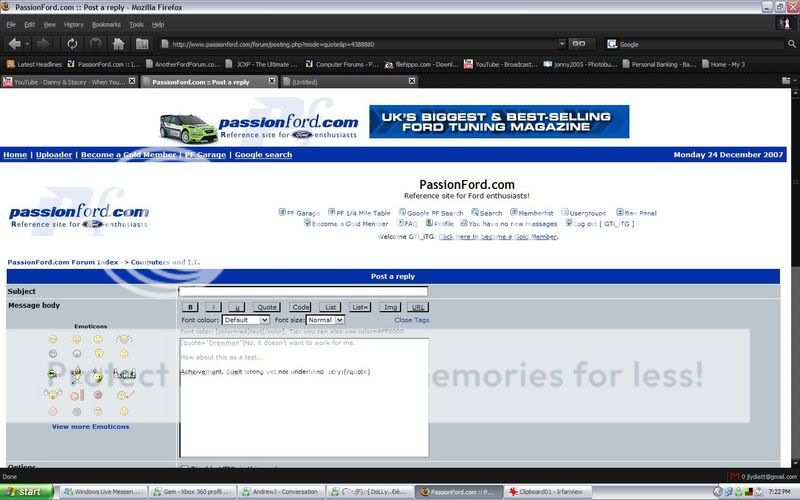
Yup, got that version with spell checker box ticked.
Would it underline it for instance as I'm typing here in this message body box?
Would it underline it for instance as I'm typing here in this message body box?

Advanced PassionFord User
Joined: May 2003
Posts: 2,086
Likes: 0
Need to have the British Dictionary add on installed for the spell checker to work on Firefox
I've uploaded the dictionary to here http://www.mediafire.com/?5hd0g1ltxgl
To install it go to File>Open File on Firefox
I've uploaded the dictionary to here http://www.mediafire.com/?5hd0g1ltxgl
To install it go to File>Open File on Firefox



Joined: May 2003
Posts: 21,268
Likes: 147
From: The Dark Side of the Moon...
Erm, I have a gmail notifier that notifies me of gmail and I don't even have to have a web-browser open 
And all my most use websites display along the top of my IE window (below the address bar) as clickable shortcuts to open in new tabs or in the same tab depending how I click them....
Spell checker I don't need, and if I do come across a word I desperately can't spell, it's easily sorted using Google anyway...
True IE doesn't scroll as smoothly as FF, but I can live with that as all the text, icons, and most pictures look ten times better in IE than in FF

And all my most use websites display along the top of my IE window (below the address bar) as clickable shortcuts to open in new tabs or in the same tab depending how I click them....
Spell checker I don't need, and if I do come across a word I desperately can't spell, it's easily sorted using Google anyway...
True IE doesn't scroll as smoothly as FF, but I can live with that as all the text, icons, and most pictures look ten times better in IE than in FF
Joined: May 2003
Posts: 21,268
Likes: 147
From: The Dark Side of the Moon...
Thats what makes me say they look better! The text is too sharp and "computer-ish" in FF, and the smiley's look pixelated (IMO). Everything looks more natural in IE (to me at least)
Thread Starter
Professional Waffler
Joined: May 2004
Posts: 27,883
Likes: 7
From: west midlands
Thrush thats another windows process you have running for gmail, i know its not going to take hardly any ram but its still extra resources, when ive got FF open its built in
People will always have their favorite anyway for one reason or other
People will always have their favorite anyway for one reason or other
Joined: May 2003
Posts: 21,268
Likes: 147
From: The Dark Side of the Moon...
What and you think a plug-in in a window browser won't use any extra resources? Not as a stand alone resourse no, but factor in if you weren't using it, the total resource use of FF would be less than if you are using it.... So really what you have is "another firefox" process you have running for gmail"
Then you say without it you have to open a browser window up and navigate to gmail - well with your FF plug in you can only see if you have new messages by opening FF - I can leave my PC, come back to it and instantly see if I have any mail without even opening anything at all - the envelope next to my clock is either white (no mail) or blue (new mail)
Question tho - how comes you mention FF so many times? This is at least the second, if not third thread I have seen you do about you using FF, and it is in every other post you make (that is reletive to computers) Not a dig, just curious.....
Then you say without it you have to open a browser window up and navigate to gmail - well with your FF plug in you can only see if you have new messages by opening FF - I can leave my PC, come back to it and instantly see if I have any mail without even opening anything at all - the envelope next to my clock is either white (no mail) or blue (new mail)
Question tho - how comes you mention FF so many times? This is at least the second, if not third thread I have seen you do about you using FF, and it is in every other post you make (that is reletive to computers) Not a dig, just curious.....

Thread
Thread Starter
Forum
Replies
Last Post
DAN@ADRIAN FLUX
General Car Related Discussion.
37
Sep 20, 2015 10:38 AM