


Okay computer type people.........


Thread Starter
20K+ Super Poster.
Joined: May 2003
Posts: 23,377
Likes: 0
 Okay computer type people.........
Here's the thing.
I'm reasonably au fait with all the computer jargon and tech speak etc, but just don't know exactly how some of the stuff works, and what exactly I need for what I'm trying to achieve.... so here goes. Maybe you can help.....
Basically, downstairs, I have a pretty okay Pentium 3 desktop computer. Nowt special, but does the job. Mostly used for internet access and basic office admin type shit - never any gaming or anything like that.
I also have a Dell P3 laptop that I use for bits and pieces.
Now here's the catch. I want to be able to access the net wirelessly from the laptop, and also access the main computer from my laptop in some sort of wireless Network configuration.
Not looking to spend a lot at all - what's the best value setup you'd recommend to achieve what I'm looking to do?
I'm reasonably au fait with all the computer jargon and tech speak etc, but just don't know exactly how some of the stuff works, and what exactly I need for what I'm trying to achieve.... so here goes. Maybe you can help.....
Basically, downstairs, I have a pretty okay Pentium 3 desktop computer. Nowt special, but does the job. Mostly used for internet access and basic office admin type shit - never any gaming or anything like that.
I also have a Dell P3 laptop that I use for bits and pieces.
Now here's the catch. I want to be able to access the net wirelessly from the laptop, and also access the main computer from my laptop in some sort of wireless Network configuration.
Not looking to spend a lot at all - what's the best value setup you'd recommend to achieve what I'm looking to do?

I've found that life I needed.. It's HERE!!
Joined: Jun 2003
Posts: 1,497
Likes: 0
From: at home
You'll need a wireless router and a PCMCIA card OR usb dongle (unless your lappy already has wireless on it)for the laptop. Think I saw PC World (booo hisss but its an example) doing an easter special in the ad in News of the World this afternoon. Should cost around £50-£60 for the lot.
Once setup you can setup a home network and access your desktop files with your wireless laptop
I have a Linksys wireless router and cannot fault it.
HTH
Andy
Once setup you can setup a home network and access your desktop files with your wireless laptop
I have a Linksys wireless router and cannot fault it.
HTH
Andy

0-60 in 17 seconds (eek)
Joined: Apr 2004
Posts: 6,717
Likes: 0
From: Berkshire
Questions for you...
-Does your desktop have a network card ?
-Who is your internet supplier ?
-Are you using a USB modem to connect to your ADSL line ?
-Is the laptop wireless enabled ?
Cheers
-Does your desktop have a network card ?
-Who is your internet supplier ?
-Are you using a USB modem to connect to your ADSL line ?
-Is the laptop wireless enabled ?
Cheers
Thread Starter
20K+ Super Poster.
Joined: May 2003
Posts: 23,377
Likes: 0
Desktop - network card? It has a port for what looks like some sort of network connection.......
ISp is BT broadband 2MB.
USB modem.
The laptop is not wireless enabled (I don't think). The only thing the laptop has is something called a PSION 56k+ fax WAN Global PC gold card - whatever the hell that is!
It's in one of the PCMCIA slots.......
The laptop only has one USB port, and I'll probably fit a mutliple USB expnansion slot to the desktop now that everything is USB....
Andy - cheers for the info........
ISp is BT broadband 2MB.
USB modem.
The laptop is not wireless enabled (I don't think). The only thing the laptop has is something called a PSION 56k+ fax WAN Global PC gold card - whatever the hell that is!
It's in one of the PCMCIA slots.......
The laptop only has one USB port, and I'll probably fit a mutliple USB expnansion slot to the desktop now that everything is USB....
Andy - cheers for the info........

10K+ Poster!!
Joined: May 2003
Posts: 10,089
Likes: 2
From: Handcuffed to the Mrs' Bed ;-)
Pon 
What you will need, is a router that is supported by your modem for a start. Then, a pcmcia network card for the laptop. The network card is not really an issue, it's the router that will work with your modem that will be the trick. Best bet, is to try and find out what wireless packages BT offer, then simply buy the kit
What you will need, is a router that is supported by your modem for a start. Then, a pcmcia network card for the laptop. The network card is not really an issue, it's the router that will work with your modem that will be the trick. Best bet, is to try and find out what wireless packages BT offer, then simply buy the kit
Trending Topics
0-60 in 17 seconds (eek)
Joined: Apr 2004
Posts: 6,717
Likes: 0
From: Berkshire
Originally Posted by RichardPON
Dan,
So what you're saying is that a wireless router will be able to link my laptop and desktop pc both for network AND net use?
So what you're saying is that a wireless router will be able to link my laptop and desktop pc both for network AND net use?

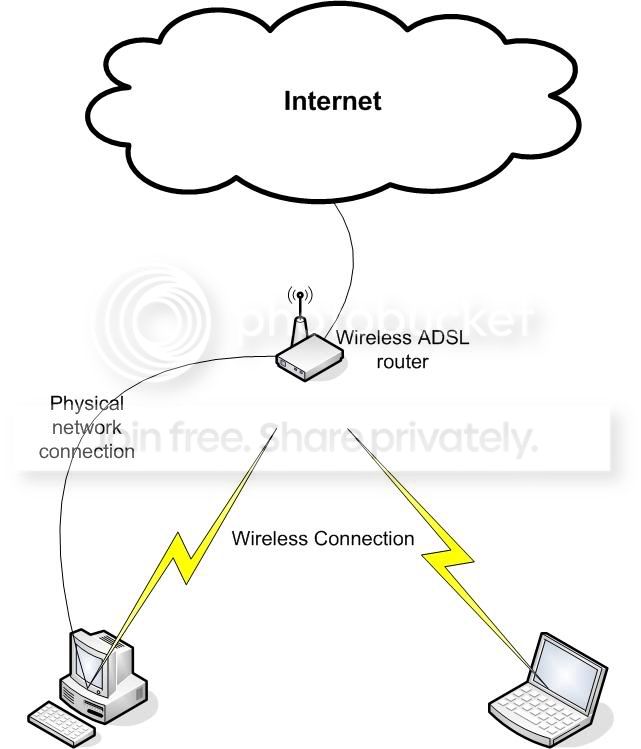
Go and buy a wireless ADSL router.
Ditch your USB modem.
Get a wireless PCMCIA or USB thing for your laptop.
Your pc has a network card by the looks of things, so that will be ok, unless you want to physically locate your PC away from where your ADSL socket is.
If that's what you want to do, get a wireless USB dongle for the desktop too.
The Wireless router plugs into the wall (where your USB modem is connected at the moment).
It will have four or so network ports at the back, you can plug your desktop pc into that if you don't want wireless between desktop and wirelss router.
The wireless router will then act as a central point for all your network activity, be it connect to the internet, or, share files between the two PC's.
I would recommend that you buy the router and usb/pcmcia wireless stuff of the same make to avoid any compatibility/range issues.
PS: forgot to say, in the picture above, the desktop pc can be connected to the router either directly, or wirelessly, there is no need to do both at the same time

Good luck
Thread Starter
20K+ Super Poster.
Joined: May 2003
Posts: 23,377
Likes: 0
Right, that makes more sense!
Pictures make things easy for Richard to understand
As you see, I'm alright with computers, but new to all this wireless malarkey!
Don't I have to have some osrt of security encryption or something for the wireless network?
Pictures make things easy for Richard to understand
As you see, I'm alright with computers, but new to all this wireless malarkey!
Don't I have to have some osrt of security encryption or something for the wireless network?
0-60 in 17 seconds (eek)
Joined: Apr 2004
Posts: 6,717
Likes: 0
From: Berkshire
Originally Posted by RichardPON
Don't I have to have some osrt of security encryption or something for the wireless network?
1. Stopping someone from using your adsl connection to surf the net.
2. Stopping someone from having a look at what data is being transmitted over your network.
To ensure 1)...
-Stop your wireless router/access point from broadcasting its SSID (the wireless lan's unique id) - This will ensure someone can't just look for WLANs and hop on, they would need to know your SSID and type it into their setup.
-Enable MAC address filtering - the MAC address is a unique reference associated to a piece of network hardware (wireless card, etc...). By only enabling those you have, you will stop someone from getting onto your network, even if they guessed your SSID. Hacking this is VERY difficult so ultra secure.
Now, none of this will stop someone from peeking at the wireless stuff that's going to and from your computer, so you are not 100% secure, whether you want to bother with the next steps or not is up to you. After all, what have you got to hide really...
To ensure 2)...
-You can setup a WEP key which is used to encrypt all transmissions over your wireless lan. The key is setup in the access point (random numbers and letters), and you will need to input it into every computer you want to have on your wireless lan (only once
.The problem with WEP encryption is that is takes a little extra work for the computer to encrypt/decrypt everything and, all things being equal, might slow your connection down a little.
To be honest, I only bother with 1), cos I don't like free loaders and someone "could" get up to no good using your ADSL connection, and the police would turn up on your doorstep while the culprit is long gone.
PS: If you are worried about credit card details, etc... you really need to worry more about the internet itself than your wireless lan.
As long as you only use secure sites when sending sensitive data, the data will be encrypted as it leaves your PC, wireless lan or not, for someone to hack into it would take a great deal of effort, if at all possible.
Now, go buy some stuff and come back to us when you try and set it all up

Thread Starter
20K+ Super Poster.
Joined: May 2003
Posts: 23,377
Likes: 0
Greg,
All well and good, BUT I want recommendations!
The BT setup would set me back about £90 for a wireless router, and a PCMCIA card........
Is this about right?
PC World have just chucked a leaflet trhough the door with some "Linksys" setup for £50 that has a wireless router and laptop card.
Or a Belkin one for £55.....
I don't know what's good and what's bad!
All well and good, BUT I want recommendations!
The BT setup would set me back about £90 for a wireless router, and a PCMCIA card........
Is this about right?
PC World have just chucked a leaflet trhough the door with some "Linksys" setup for £50 that has a wireless router and laptop card.
Or a Belkin one for £55.....
I don't know what's good and what's bad!
10K+ Poster!!
Joined: May 2003
Posts: 10,089
Likes: 2
From: Handcuffed to the Mrs' Bed ;-)
0-60 in 17 seconds (eek)
Joined: Apr 2004
Posts: 6,717
Likes: 0
From: Berkshire
I don't know anything about the BT setup... as for the others... well...
Nothing I've had has lasted more than a year, but it seems it's only me.
A few weeks ago, I would have recommended Linksys, but mine is on the blink and have been on the phone to their support desk (in india) to try and get a replacement under warranty.
Because I don't have a receipt, my less than 2 year old router (it was only just released them) which is warrantied for three years can't be replaced. I can't prove I bought it, so I have no warranty. The chap on the phone had nothing other than "you must have a receipt" to say
He then tells me to write down a reference number, should I wish to call them back - I'll let you guess where I told him to shove it
Belkin, netgear, d-link, etc... are all good to be honest, much of a muchness.
SMC have a five year warranty though... guess where I am going next (and keeping my b***y receipt).
If I had the time, I'd do a quick google search for reviews and take it from there... sites for PC-Magazine, PC-Pro will probably have old-ish reviews online for you to look at.
Nothing I've had has lasted more than a year, but it seems it's only me.
A few weeks ago, I would have recommended Linksys, but mine is on the blink and have been on the phone to their support desk (in india) to try and get a replacement under warranty.
Because I don't have a receipt, my less than 2 year old router (it was only just released them) which is warrantied for three years can't be replaced. I can't prove I bought it, so I have no warranty. The chap on the phone had nothing other than "you must have a receipt" to say
He then tells me to write down a reference number, should I wish to call them back - I'll let you guess where I told him to shove it
Belkin, netgear, d-link, etc... are all good to be honest, much of a muchness.
SMC have a five year warranty though... guess where I am going next (and keeping my b***y receipt).
If I had the time, I'd do a quick google search for reviews
and take it from there... sites for PC-Magazine, PC-Pro will probably have old-ish reviews online for you to look at.
Thread Starter
20K+ Super Poster.
Joined: May 2003
Posts: 23,377
Likes: 0
Marvellous - will be having a quick look around then
Think I might go for this linksys stuff - £50 aint too bad if it packs up after a couple of years or something
Dan - PC World have that linksys card WITH a router for £50 - could be the way forward!
Think I might go for this linksys stuff - £50 aint too bad if it packs up after a couple of years or something
Dan - PC World have that linksys card WITH a router for £50 - could be the way forward!
0-60 in 17 seconds (eek)
Joined: Apr 2004
Posts: 6,717
Likes: 0
From: Berkshire
Just had a look at PCworld online (not that busy ), the USB adapter is HUGE.... should be nothing more than a little key really... It'd be like having a cannon ball lashed to your leg, defeats the point of having a laptop imo
Also, check that your laptop and pc (if you're going wireless) are usb 2.0 compatible, or, that the wireless usb thingy is backwards compatible with usb 1.1, or you could have a whole heap of stuff that won't work at all
Judging by your description of the desktop, I doubt very much it supports v2, let alone USB...
), the USB adapter is HUGE.... should be nothing more than a little key really... It'd be like having a cannon ball lashed to your leg, defeats the point of having a laptop imo Also, check that your laptop and pc (if you're going wireless) are usb 2.0 compatible, or, that the wireless usb thingy is backwards compatible with usb 1.1, or you could have a whole heap of stuff that won't work at all
Judging by your description of the desktop, I doubt very much it supports v2, let alone USB...
0-60 in 17 seconds (eek)
Joined: Apr 2004
Posts: 6,717
Likes: 0
From: Berkshire
This is more like it:
http://www.pcworld.co.uk/martprd/product/seo/257700
I would prefer this for the laptop
http://www.pcworld.co.uk/martprd/product/seo/459034
PCMCIA card is more secure (less likely to fall or break) when you move about with the laptop
http://www.pcworld.co.uk/martprd/product/seo/257700
I would prefer this for the laptop
http://www.pcworld.co.uk/martprd/product/seo/459034
PCMCIA card is more secure (less likely to fall or break) when you move about with the laptop
0-60 in 17 seconds (eek)
Joined: Apr 2004
Posts: 6,717
Likes: 0
From: Berkshire
Originally Posted by RichardPON
Eh?
The desktop has two USB ports in the back, so why would it not support USB?
The desktop has two USB ports in the back, so why would it not support USB?
Do you know if they are USB 2.0 or 1.1 (prob 1.1), in which case, make sure the dongle you buy is 1.1 compatible.
All useless if you are running a bit of network cable between your pc and the wireless router though
10K+ Poster!!
Joined: May 2003
Posts: 10,089
Likes: 2
From: Handcuffed to the Mrs' Bed ;-)

Thread
Thread Starter
Forum
Replies
Last Post
chowfornow
Ford Non RS / XR / ST parts for sale.
14
Jan 5, 2019 09:01 PM
Johnny Knoxville
General Car Related Discussion.
4
Sep 30, 2015 07:21 AM