


HELP!!! , any IT experts slow internet!!!!


Thread Starter
ELASTIC BAND


Joined: May 2004
Posts: 14,219
Likes: 98
From: rainham, essex
 HELP!!! , any IT experts slow internet!!!!
Im with virgin on 10 meg, now via speed tests in the past its allways come back near on 10meg,
now the last two weeks my nets been worse than the dial up days!
Im on the case with virgin support, but not getting anywhere fast, they ask me to do something , then send a report and they come back to me all fine! ( no it fucking aint ) then ask me to try something else
Anyway just asking if any IT people can help me out?


now the last two weeks my nets been worse than the dial up days!
Im on the case with virgin support, but not getting anywhere fast, they ask me to do something , then send a report and they come back to me all fine! ( no it fucking aint
) then ask me to try something elseAnyway just asking if any IT people can help me out?
Last edited by Fil; Jun 10, 2009 at 06:38 PM.

Thread Starter
ELASTIC BAND
Joined: May 2004
Posts: 14,219
Likes: 98
From: rainham, essex
I'd thought i'd try a few different ones to see if there was any difference?
heres a london one then, again

just to add, ive taken my wireless router out of the circuit, so running the modem via eithernet straight into my pc, tried to other pcs aswell, all the same shit slow connection?
heres a london one then, again
just to add, ive taken my wireless router out of the circuit, so running the modem via eithernet straight into my pc, tried to other pcs aswell, all the same shit slow connection?

Wahay!! I've lost my Virginity!!
Joined: Aug 2007
Posts: 61
Likes: 0
From: everywhere...like dog shit
somewhere in your house will be your main socket, with a detachable front plate on it. . . take it off and there is a test socket, plug your router into that and log onto the router homepage to see what speed your router see's. . . if its low then there is a problem outside your house and your hands, either a problem with the lines too your house or at the exchange . . . if its fast then there's a problem in your house somewhere, maybe a knackered ADSL filter or faulty socket etc etc.
cheers
Tim
cheers
Tim

filter is first thing as long as youre wireless signal is high..
Then reset youre box and reconnect.
Have you just bought a new wireless phone etc etc.
If so change channel from 11 to 6 or visa versa,
if none of that works its a virgin problem.
Then reset youre box and reconnect.
Have you just bought a new wireless phone etc etc.
If so change channel from 11 to 6 or visa versa,
if none of that works its a virgin problem.

Advanced PassionFord User
Joined: Sep 2003
Posts: 1,935
Likes: 0
From: Reading
somewhere in your house will be your main socket, with a detachable front plate on it. . . take it off and there is a test socket, plug your router into that and log onto the router homepage to see what speed your router see's. . . if its low then there is a problem outside your house and your hands, either a problem with the lines too your house or at the exchange . . . if its fast then there's a problem in your house somewhere, maybe a knackered ADSL filter or faulty socket etc etc.
cheers
Tim
cheers
Tim
thats the next thing you should try
Trending Topics

10K+ Poster!!
Joined: May 2003
Posts: 10,089
Likes: 2
From: Handcuffed to the Mrs' Bed ;-)
Deffo something wrong there m8. I'd disconnect the router and go ethernet straight from the cable modem into the PC and test it. If there's still a problem then it probably lies outside the house. I'd be asking for an engineer round there sharpish !!!
Other way to get an accurate reading is to download something from microsoft.
Other way to get an accurate reading is to download something from microsoft.
Wahay!! I've lost my Virginity!!
Joined: Aug 2007
Posts: 61
Likes: 0
From: everywhere...like dog shit
Cheers
Tim

Wahay!! I've lost my Virginity!!
Joined: Aug 2007
Posts: 61
Likes: 0
From: everywhere...like dog shit
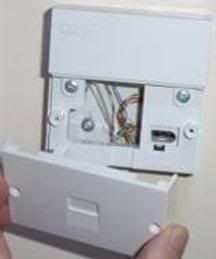
Test sockets behind the front plate,hope this helps, if you've got the older style single socket without the removable half front then there is no way of testing back to the exchange unfortunately, not without paying for an engineer to come out anyway.
Thread Starter
ELASTIC BAND
Joined: May 2004
Posts: 14,219
Likes: 98
From: rainham, essex
when its plugged into the test socket . . go to "start" . . "run" . . .type "cmd' . . this will open a black window. . . type "ipconfig" and hit enter, take a note of your default gateway . . it'll be 192.168.1. . . . or similar, open internet explorer and type that number into your address bar, that'll open your router homepage and you can see what speed your router is getting from the exchange, if you do a download test as normal i.e speedtest there won't be a change as your BRAS profile can take 3 days to recognise any wiring changes (therefore speedtests won't give the correct reading)
Cheers
Tim
Cheers
Tim

20K+ Super Poster.
Joined: May 2003
Posts: 20,599
Likes: 0
From: Ramsgate, Kent Drives: E39 530D Touring
browse to:
http://192.169.100.1
log in with root (password written on the screen, cant remember what it is off the top of my head)
post up all the details n all the pages, especially operational config and downstream status
these figures will tell us if the issue is obvbiously to do with the cable network (which it probably is TBH...)
http://192.169.100.1
log in with root (password written on the screen, cant remember what it is off the top of my head)
post up all the details n all the pages, especially operational config and downstream status
these figures will tell us if the issue is obvbiously to do with the cable network (which it probably is TBH...)

Advanced PassionFord User
Joined: May 2003
Posts: 2,211
Likes: 0
From: Brentwood Essex
this only applys to bt network fed adsl lines, not cable broadband..
20K+ Super Poster.
Joined: May 2003
Posts: 20,599
Likes: 0
From: Ramsgate, Kent Drives: E39 530D Touring
timmy, hes not got ADSL, it works differently
Thread Starter
ELASTIC BAND
Joined: May 2004
Posts: 14,219
Likes: 98
From: rainham, essex
browse to:
http://192.169.100.1
log in with root (password written on the screen, cant remember what it is off the top of my head)
post up all the details n all the pages, especially operational config and downstream status
these figures will tell us if the issue is obvbiously to do with the cable network (which it probably is TBH...)
http://192.169.100.1
log in with root (password written on the screen, cant remember what it is off the top of my head)
post up all the details n all the pages, especially operational config and downstream status
these figures will tell us if the issue is obvbiously to do with the cable network (which it probably is TBH...)
jim im getting, IE can not display this page , when clicking that link

PassionFord Post Whore!!
Joined: May 2003
Posts: 7,757
Likes: 0
From: Norwich, Norfolk, UK
Thread Starter
ELASTIC BAND
Joined: May 2004
Posts: 14,219
Likes: 98
From: rainham, essex
should be http://192.168.100.1
edit : ahh passwords root too!
Thread Starter
ELASTIC BAND
Joined: May 2004
Posts: 14,219
Likes: 98
From: rainham, essex
RIGHT
Acquire Downstream Channel 586750000 Hz Locked
Connectivity State OK Operational
Boot State OK Operational
Security Enabled BPI
Downstream Frequency : 586750000 Hz
Downstream Modulation : QAM64
Downstream Interleave Depth : taps12increment17
Downstream Receive Power Level : 8.9 dBm
VDownstream SNR : 17.8 dB
Upstream Transmit Power Level : 40.50 dBm
VUpstream Symbol Rate : 2560 Ksym/sec
Upstream Frequency : 34000000 Hz
Upstream Mini-Slot Size : 2
Cable Modem Status
Procddure
Procddure
Status
Comment
Acquire Downstream Channel 586750000 Hz Locked
Connectivity State OK Operational
Boot State OK Operational
Security Enabled BPI
Downstream Status
Downstream Lock : LockedDownstream Frequency : 586750000 Hz
Downstream Modulation : QAM64
Downstream Interleave Depth : taps12increment17
Downstream Receive Power Level : 8.9 dBm
VDownstream SNR : 17.8 dB
Upstream Status
Upstream Channel ID : 3Upstream Transmit Power Level : 40.50 dBm
VUpstream Symbol Rate : 2560 Ksym/sec
Upstream Frequency : 34000000 Hz
Upstream Mini-Slot Size : 2
Upstream Burst Descriptor
request(1)initialRanging(3)periodicRanging(4)shortData(5)longData(6)Modulation TypeQPSK QPSK QPSK QPSK QPSK Differential EncodingOff Off Off Off Off Preamble Length6412812810080Preamble Offset39666396396FEC T Bytes05539FEC K Bytes16343478232Scrambler Seed338338338338338Max Burst000350Guard Time8484825137Last CodewordFixed Fixed Fixed Short Short ScramblerOn On On On On Operation Configuration
Network Access : AllowedMaximum Downstream Data Rate : 10240000Maximum Upstream Data Rate : 512000Maximum Upstream Channel Burst : 1600Modem Capability : Concatenation Enabled, Fragmentation Disabled, PHS DisabledMaximum Number of CPEs : 1
Last edited by Fil; Jun 10, 2009 at 09:48 PM.
20K+ Super Poster.
Joined: May 2003
Posts: 20,599
Likes: 0
From: Ramsgate, Kent Drives: E39 530D Touring
right, your cable is fucked i can tell you that straight away, its not your equipment
http://www.cableforum.co.uk/board/12...al-levels.html
http://www.cableforum.co.uk/board/12...al-levels.html

Thread Starter
ELASTIC BAND
Joined: May 2004
Posts: 14,219
Likes: 98
From: rainham, essex
right, your cable is fucked i can tell you that straight away, its not your equipment
http://www.cableforum.co.uk/board/12...al-levels.html
http://www.cableforum.co.uk/board/12...al-levels.html
What i do what to know is why the fuck couldnt virgin tell me that, useless cunts!
Last edited by Fil; Jun 10, 2009 at 09:55 PM.
20K+ Super Poster.
Joined: May 2003
Posts: 20,599
Likes: 0
From: Ramsgate, Kent Drives: E39 530D Touring
Fil, the helpdesk can see all that information you have just coped n pasted and should know straight away there is a problem. if they give you grief then either youre speaking to an IDIOT or theyre blagging you
Thread Starter
ELASTIC BAND
Joined: May 2004
Posts: 14,219
Likes: 98
From: rainham, essex
Thanks for getting in touch with the Virgin Media Support team.
I'm sorry to hear you're having problems with your broadband speed.
I have checked for issues in your area and have found none. I have also run a few tests on your modem and it appears to be working fine.
I'm sorry to hear you're having problems with your broadband speed.
I have checked for issues in your area and have found none. I have also run a few tests on your modem and it appears to be working fine.

Thread Starter
ELASTIC BAND
Joined: May 2004
Posts: 14,219
Likes: 98
From: rainham, essex

10K+ Poster!!
Joined: May 2003
Posts: 11,977
Likes: 1
From: Brierley Hill
Nice findings on that link, Jim.
Ive bookmarked as I sometimes have to call them (rarely)
Had one guy asking me about spyware after being on the phone for around 15 minutes, and doing necessary checks, so I said I worked in IT and probably understood the VM network better than him
Passed to 2nd line, "yes there is a problem, we'll sort it in the next 30 minutes". Was sorted in about 5, but I do have to give the 1st line support people credit as a LOT of the issues are probably firewall/spyware/virus/etc etc related issues.

Ive bookmarked as I sometimes have to call them (rarely)
Had one guy asking me about spyware after being on the phone for around 15 minutes, and doing necessary checks, so I said I worked in IT and probably understood the VM network better than him
Passed to 2nd line, "yes there is a problem, we'll sort it in the next 30 minutes". Was sorted in about 5, but I do have to give the 1st line support people credit as a LOT of the issues are probably firewall/spyware/virus/etc etc related issues.
Thread Starter
ELASTIC BAND
Joined: May 2004
Posts: 14,219
Likes: 98
From: rainham, essex
 can we get the same stats off your new one?
Thread Starter
ELASTIC BAND
Joined: May 2004
Posts: 14,219
Likes: 98
From: rainham, essex
Cable Modem Downstream
Downstream Lock : Locked
Downstream Channel Id : 6
Downstream Frequency : 586750000 Hz
Downstream Modulation : QAM64
Downstream Symbol Rate : 6952 Ksym/sec
Downstream Interleave Depth : taps12Increment17
Downstream Receive Power Level : -5.0 dBmV
Downstream SNR : 34.7 dB
Cable Modem Upstream
Upstream Lock : Locked
Upstream Channel ID : 1
Upstream Frequency : 25800000 Hz
Upstream Modulation : QPSK
Upstream Symbol Rate : 2560 Ksym/sec
Upstream transmit Power Level : 44.0 dBmV
Upstream Mini-Slot Size : 2

Thread
Thread Starter
Forum
Replies
Last Post
DavidK
Ford Sierra/Sapphire/RS500 Cosworth
1
Sep 27, 2015 02:55 PM