


Any computer bods out there?


Thread Starter
15K+ Super Poster!!
Joined: Oct 2003
Posts: 18,685
Likes: 1
From: All over the friggin place!!!
 Any computer bods out there?
For some reason my PC at home has gone into spaz mode.
When i turn it on, instead of working properly, it gives me the options to start in safe mode, or start in safe mode with networking. Whenever i try either option it just does a full circle on itself and takes me back to the same page, or goes into sleep mode
Ive tried pressing F8 when i first start up the pc and that also gives me quite a few options, all of which take me back to that very first page of asking whether to start up in safe mode, or goes into sleep mode.
Any ideas would be greatly appreciated!
When i turn it on, instead of working properly, it gives me the options to start in safe mode, or start in safe mode with networking. Whenever i try either option it just does a full circle on itself and takes me back to the same page, or goes into sleep mode
Ive tried pressing F8 when i first start up the pc and that also gives me quite a few options, all of which take me back to that very first page of asking whether to start up in safe mode, or goes into sleep mode.
Any ideas would be greatly appreciated!

Advanced PassionFord User
Joined: Jul 2003
Posts: 1,716
Likes: 0
From: UK
My mates did this the other day for no reason...
I'll hav a look at it tonight and report back what has happened..
Normally this is either a corrupt operating system, or a problem with the MBR..
I'll hav a look at it tonight and report back what has happened..
Normally this is either a corrupt operating system, or a problem with the MBR..

Maria, most computers will beep at you if there is a serious hardware fault, so if when you turn it on you get a couple of beeps you didnt it can be a really good indication of whats wrong, that was why I was asking.
If you could get hold of a windows CD to boot off, that might at least let you know if its a hardware fault or a problem with the windows instalation.
If you could get hold of a windows CD to boot off, that might at least let you know if its a hardware fault or a problem with the windows instalation.

Professional Waffler
Joined: May 2004
Posts: 27,883
Likes: 7
From: west midlands
if you had a windows xp cd you could probably get it working agian in about 2mins! put the cd in, turn the pc on and then you can probably do a "recovery" kinda thing.
Im not 100% on this as i havent done it before but im pretty certain having the cd would help you out
Im not 100% on this as i havent done it before but im pretty certain having the cd would help you out
Trending Topics
Originally Posted by maria
Chip-3Door - thanks for the advice! am i likely to have lost everything?
hmmmmmmmm need to find the disc......
hmmmmmmmm need to find the disc......
If worse comes to the worse you can no doubt get your data back by putting the harddisk into a different PC to copy it off onto a DVD or whatever.
Thread Starter
15K+ Super Poster!!
Joined: Oct 2003
Posts: 18,685
Likes: 1
From: All over the friggin place!!!
yeah i think thats what im gonna have to do.....
im just bloody clueless when it comes to these kind of things, so think im gonna have to take it to someone to do anyway. I just dread losing all the pictures of smelly that i had! ** makes mental note to take hard copies of everything in future**
im just bloody clueless when it comes to these kind of things, so think im gonna have to take it to someone to do anyway. I just dread losing all the pictures of smelly that i had! ** makes mental note to take hard copies of everything in future**
Professional Waffler
Joined: May 2004
Posts: 27,883
Likes: 7
From: west midlands
im pretty sure your hard drive is ok because normally when its on its way out it will start making clicking noises and you would probably notice it takes longer to load things, you havent said anything about the pc prior to this happening so that tells me that the chances of you losing anything are very slim.
Your clearly on another pc now, cant you just take it out and put it into another one?(or get someone else to)
Your clearly on another pc now, cant you just take it out and put it into another one?(or get someone else to)

PassionFord Post Troll
Joined: Aug 2004
Posts: 2,933
Likes: 0
From: Benfleet - Essex
If there is an option to "use last known good configuration" then use that, then back everything up just in case
We had 2 PCs at work do the same thing this week, both fixed by doing the above
We had 2 PCs at work do the same thing this week, both fixed by doing the above
Advanced PassionFord User
Joined: Jul 2003
Posts: 1,716
Likes: 0
From: UK
The last known working configuration will not work, nor will safe mode..
The data on the disk should be fine, just the XP OS is corrupted..
If you do run the CD then you can goto a recovery console. I suggest you find someone nearby to do this though as doing the wrong thing could kill he partition and also your data.
TBH I'd play it safe, drop another drive in and install XP on there, slave the existing drive up and copy data across if you need stuff quickly.
Andy
The data on the disk should be fine, just the XP OS is corrupted..
If you do run the CD then you can goto a recovery console. I suggest you find someone nearby to do this though as doing the wrong thing could kill he partition and also your data.
TBH I'd play it safe, drop another drive in and install XP on there, slave the existing drive up and copy data across if you need stuff quickly.
Andy
Thread Starter
15K+ Super Poster!!
Joined: Oct 2003
Posts: 18,685
Likes: 1
From: All over the friggin place!!!
GTi_iTG - im on my works pc now.... and before hand it had started to run REALLY slow.... i just assumed this was norton, as ever since i installed that, my pc has run like a sack of shit!
dvid - ive tried that, and it still takes me back to the same page....
AndyBlackFRST - thanks for the advice hunny..... i think im gonna have to bite the bullet and take it somewhere
dvid - ive tried that, and it still takes me back to the same page....
AndyBlackFRST - thanks for the advice hunny..... i think im gonna have to bite the bullet and take it somewhere
Thread Starter
15K+ Super Poster!!
Joined: Oct 2003
Posts: 18,685
Likes: 1
From: All over the friggin place!!!
desk top.
its a shitty little thing that i rarely use to be honest, as im normally always on my works pc. Its just got so many pictures on there from my camera.
its a shitty little thing that i rarely use to be honest, as im normally always on my works pc. Its just got so many pictures on there from my camera.

It's probably giving you a blue screen of death saying 'Inaccessible Boot Device'.
In their infinite wisdom, Microsoft thought it a great idea to have XP restart the computer instead of leaving these useful nuggets of information on the screen.
The above 'repair' option when booting from the computer from the XP CD should see you OK - all it'll do normally is check and fix any filing system errors that prevent Windows from finding files it needs to start. Choose to do the 'Fast Repair' when you get that far.
In their infinite wisdom, Microsoft thought it a great idea to have XP restart the computer instead of leaving these useful nuggets of information on the screen.
The above 'repair' option when booting from the computer from the XP CD should see you OK - all it'll do normally is check and fix any filing system errors that prevent Windows from finding files it needs to start. Choose to do the 'Fast Repair' when you get that far.

10K+ Poster!!
Joined: May 2003
Posts: 10,089
Likes: 2
From: Handcuffed to the Mrs' Bed ;-)
Righto,
To actually do the repair process correctly you need to do the following :
Boot off the windows xp professional / home cd
follow the steps through as if you are going to install windows xp
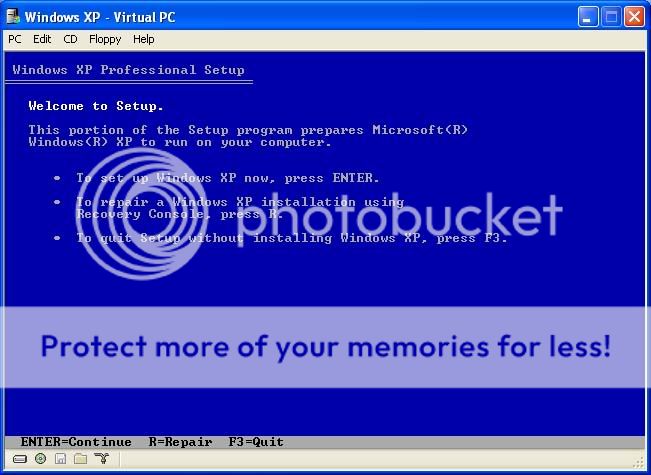
then there is an option to repair the current installed version of xp <this is slightly different as it was a fresh install>
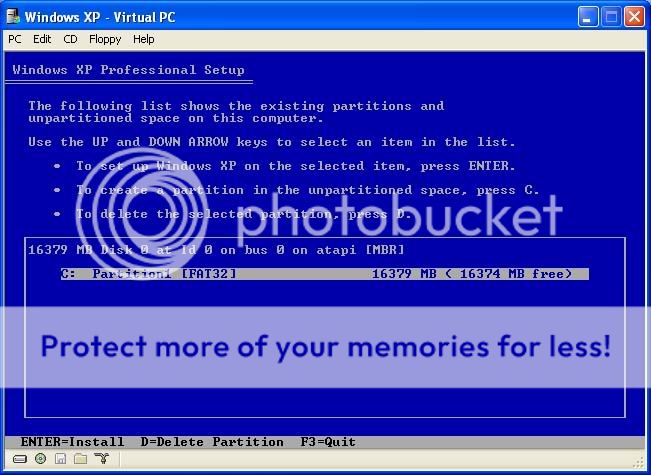
I will provide copmplete step by step instructions in the computer discussion section later
To actually do the repair process correctly you need to do the following :
Boot off the windows xp professional / home cd
follow the steps through as if you are going to install windows xp
then there is an option to repair the current installed version of xp <this is slightly different as it was a fresh install>
I will provide copmplete step by step instructions in the computer discussion section later


 monday blues..lol
 youve all jusy sonfused the fook outta me!
As its a desktop, if you can find someone local to you who is fairly IT literate then whacking your hard disk in their machine to copy all your pictures off would be my first port of call given that by the sounds of it the pictures matter to you FAR more than getting the PC working does, so I would sort that first, then have a go at fixing the PC afterwards.
10K+ Poster!!
Joined: May 2003
Posts: 10,089
Likes: 2
From: Handcuffed to the Mrs' Bed ;-)
Originally Posted by Chip-3Door
As its a desktop, if you can find someone local to you who is fairly IT literate then whacking your hard disk in their machine to copy all your pictures off would be my first port of call given that by the sounds of it the pictures matter to you FAR more than getting the PC working does, so I would sort that first, then have a go at fixing the PC afterwards.

Thread Starter
15K+ Super Poster!!
Joined: Oct 2003
Posts: 18,685
Likes: 1
From: All over the friggin place!!!
Chip-3Door - yeah youre exactly right, i couldnt give a toss about the hardrive really as i know i can pick them up fairly cheap, i just dont want to lose the pictures of smelly 
but on the other hand, it would make my life a lot easier if i could stick with the same one!
spiky, i said to andy ill check to see if ive got my disc at home...... or is the disc youre on about a completely different one to the one im thinking?
but on the other hand, it would make my life a lot easier if i could stick with the same one!
spiky, i said to andy ill check to see if ive got my disc at home...... or is the disc youre on about a completely different one to the one im thinking?

Advanced PassionFord User
Joined: Jul 2004
Posts: 2,394
Likes: 0
From: West London
I had to fix this on my cousins computer a few weeks ago, when you get to the screen 'last known' 'safe mode' etc whichever one you choose the pc decides to restart itself?
Just put the xp disc in, go through the disc as if you are doing an installation, but when you see the option to press R for repair thats the one you want, you wont lose any data, nothing
Just put the xp disc in, go through the disc as if you are doing an installation, but when you see the option to press R for repair thats the one you want, you wont lose any data, nothing


dont start recovery or the installation thou, as you will loose all ya stuff, worse case, do as chip said and send me your hard disk so i can backup your doc's
or
send the whole box and i'll rebuild it for you
or
send the whole box and i'll rebuild it for you

I've found that life I needed.. It's HERE!!
Joined: Jul 2005
Posts: 1,263
Likes: 1
From: derbyshire
Originally Posted by maria
GTi_iTG it had started to run REALLY slow.... i just assumed this was norton, as ever since i installed that, my pc has run like a sack of shit!
i had a similar problem when i installed a new AV but left the old 1 running too , they were both trying to access the hard drive at the same time and crashing the system at startup , furthest i could get was the "safe boot" option screen
Thread Starter
15K+ Super Poster!!
Joined: Oct 2003
Posts: 18,685
Likes: 1
From: All over the friggin place!!!
Ady Si - thats exactly it!!! thankyou ill give it a go as long as i can find my disc!
Stu.H - hunny im nowhere near zoo, im in ipswich. but thank you for the offer though!
Spiky - youre just confusing me now! how about.... when i find my disc, or borrow yours, ill ring you and you can talk me through it? lol... either that or i think andy will talk me through it!
bluescortcossie - ah.... possibly?! er... yeah think so! that could explain a few things!
Stu.H - hunny im nowhere near zoo, im in ipswich. but thank you for the offer though!
Spiky - youre just confusing me now! how about.... when i find my disc, or borrow yours, ill ring you and you can talk me through it? lol... either that or i think andy will talk me through it!
bluescortcossie - ah.... possibly?! er... yeah think so! that could explain a few things!
 thanks for all your help guys!

20K+ Super Poster.
Joined: May 2003
Posts: 23,377
Likes: 0
The EXACT same thing happened to me on Friday.
Got the HD out and slaved it onto my mates computer. Backed all the stuff up, reinstalled windows, and all sorted.
As the experts above have said, you wont have lost the stuff. Like mine, the OS was corrupted in some way....
Got the HD out and slaved it onto my mates computer. Backed all the stuff up, reinstalled windows, and all sorted.
As the experts above have said, you wont have lost the stuff. Like mine, the OS was corrupted in some way....