Right, had this discussion with St3v3 last night, so thought I'd post it up for all to see.
I am sure this will be familiar to some of you, but others may benefit

Go to
www.photobucket.com and create a new album
Download filezilla from here:
http://filezilla.sourceforge.net/ , it’s free !!!
Install filezilla
Run filezilla
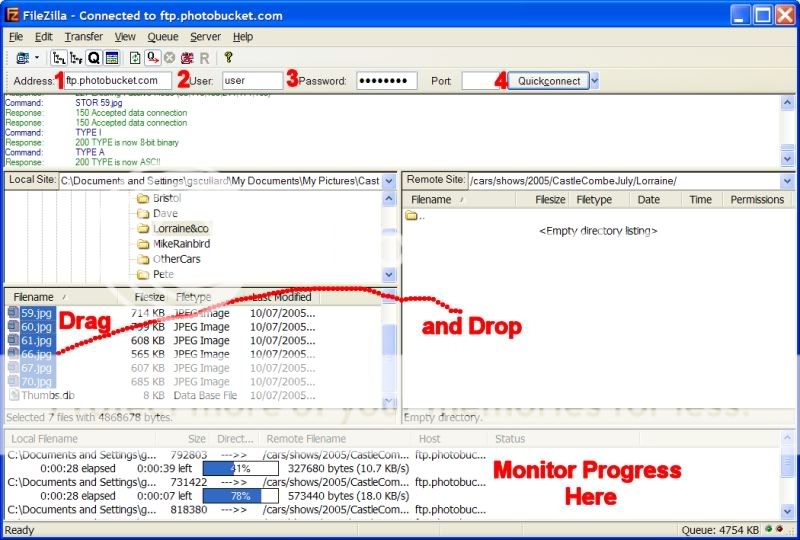
In the Address field, enter ftp.filezilla.com (1)
In the user field, enter your username (2)
In the password field, enter you password (3)
Then click on the “QuickConnect” button (4)
This should log you onto photobucket
In the “Remote Site” window (right hand side), navigate to the album you want to add pictures to.
Note: In the “Remote Site” window, if you right click in the white space, you can create a new directory, this is equivalent to adding an album in photobucket.
In the “Local Site” window (left hand side), navigate to where your pictures are.
Select the pictures you want to upload, and drag-drop them into the relevant album in the right hand window.
Keep going with any other pictures you may have to upload
Filezilla will automatically upload all your pictures to photobucket, you can monitor progress in the window at the bottom of the main Filezilla window.
Et voila, easy multiple image uploads to photobucket.
You can also do it the other way, so you can download loads of images from photobucket at once.
I don’t recomment you rename or delete images on photobucket using Filezilla, although you can physically do it, photobucket gets confused if you do, so you’ll have to use the photobucket web interface to do it.
Here it is in a picture
Enjoy
